
Ducati Diavel Service Manual: Fairings
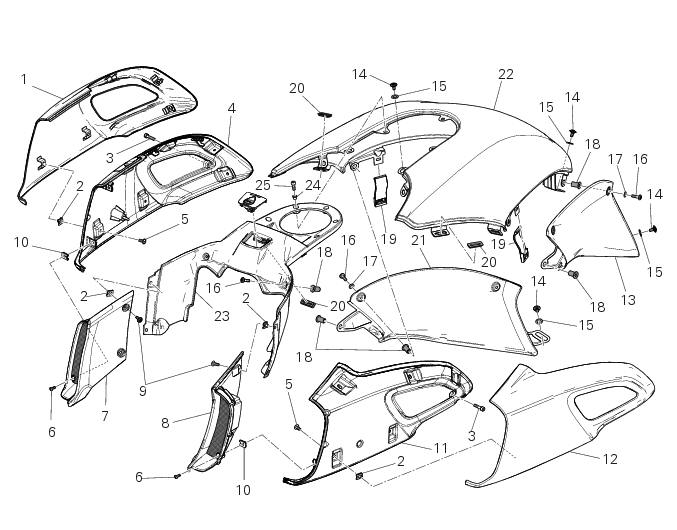
- Rh front half-fairing
- Clip
- Screw
- Right-hand support
- Screw
- Screw
- Rh air inlet
- Lh air inlet
- Screw
- Clip
- Left-hand support
- Lh front half-fairing
- Lh tank fairing
- Screw
- Nylon washer
- Special screw
- Washer
- Spacer
- Spring
- Rubber pad
- Rh tank fairing
- Tank fairing
- Tank plug cover
- Spacer
- Screw
Spare parts catalogue
Diavel abs fairing
Diavel carbon abs fairing
Important
Bold reference numbers in this section identify parts not shown in the figures alongside the text, but which can be found in the exploded view diagram.
- Removal of the fuel tank fairings
- Disassembly of the front half-fairings
- Reassembly of the front half-fairings
- Refitting the fuel tank fairings
 Refitting the rear-view mirrors
Start the screws (2) in their thread on the rear-view mirrors (1), inserting
the washers (4) as shown in the picture.
Insert the rear-view mirrors (1) in the u-bolts (3).
Tighten the screws ...
 Removal of the fuel tank fairings
Remove the rh air inlet (7) by loosening screws (6) and (9).
Undo the retaining screw (3) of the rh front half-fairing (1).
Slightly pull the pin (a) to disengage it from the seal (b), a ...
Other materials:
Refitting the cooling system hoses and unions
Position the pump/radiator sleeve (22) and the radiator/radiator sleeve (23).
Fit sleeve (23) and sleeve (22) to their corresponding fittings (n) and (o), and
bring them fully home on collars (p).
Note
Sleeves (23) and (22) must be oriented so that the grooves (q) match the
tabs (r) on fitt ...
Engine setting function (engine power control)
This function customises engine power and output.
To access the function it is necessary to view the ""setting" menu", using
buttons (1) "s" or (2) "t" select the "riding
mode" function and press the reset button (3) to enter the following page.
Use button (1) "s" or (2) "t" to select the r ...
System components
Screw
Abs front speed sensor
Sealing washer
Hose grommet
Abs rear speed sensor
Abs control unit
Front pump - control unit pipe
Control unit - front callipers pipe
Rear pump - control unit pipe
Control unit - rear calliper pipe
Sealing washer
Support
Spacer
Rubber mou ...