
Ducati Diavel Owners Manual: Identification data
All ducati motorcycles have two identification numbers, for
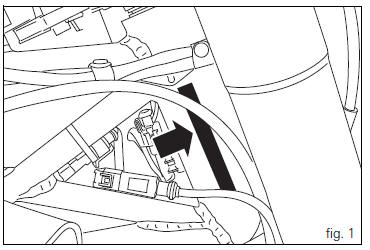
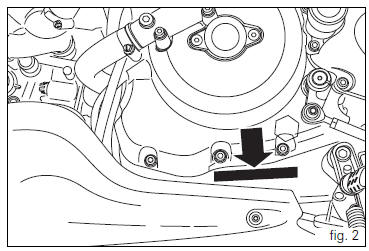
frame (fig. 1) And engine (fig. 2). 
 Note
Note
These numbers indicate the motorcycle model and should be quoted when ordering spare parts.
 Carrying the maximum load allowed
Your motorcycle is designed for travelling over long
distances with a full load in complete safety.
Even weight distribution is critical to preserving these safety
features and avoiding trouble w ...
 Instrument panel (dashboard)
The vehicle is equipped with two instrument panels: an lcd
(1, fig. 3) Located on the handlebar containing the key
indications (speed, rpm, coolant temperature and clock) and
a tft colour display ( ...
Other materials:
Removal of the cylinder/piston assembly
Loosen the clamps (7) and remove the hoses (8) and (9) from the cylinder
barrels (10) and from the alternator-side
crankcase cover.
If damaged, unscrew the unions (6).
Note
The following procedure is described with the engine removed from the
frame and the cylinder head r ...
Removing of the front sprocket
Undo the screws (11) and remove the chain cover (10).
Loosen the chain (sect. 4 - 3, Adjusting the chain tension).
Remove the chain with the tool code 88713.1344.
The tool is composed of a holder (a), punch (b), body (c) and two wrenches (d)
and (e).
Fit the link to be opened into th ...
Refitting the crankshaft/connecting rod assembly
Install the connecting rod assembly (6) and (2) in the crankcase, carry out
the shimming and crankcase half reassembly
procedure as described in sect. 9 - 9.2, Reassembly of the crankcase halves.
Important
Make sure that the connecting rods (2) are correctly positioned in the
cylinders. Incor ...