
Ducati Diavel Service Manual: Changing the clutch fluid
Warning
Clutch fluid will damage painted surfaces if spilled on them. It is also very harmful if it comes into contact with the skin or with the eyes; in the event of accidental contact wash the affected area with abundant running water.
Remove cover (1) and membrane from the clutch fluid reservoir (2) by loosening the screws (3).
Siphon off the fluid from the reservoir (2).
Fill the tank (2) with new oil up to the max. Mark.
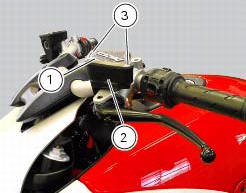
Operate the clutch lever two or three times until the circuit is pressurised.
Hold the lever pulled in towards the grip.
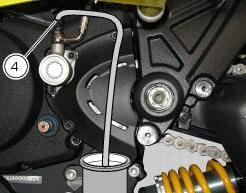
Attach a length of transparent plastic tubing to the bleed valve (4) and insert the other end of the tubing in a container Placed on the floor.
Open the bleed valve (4) to allow fluid to escape.
Warning
During the filling operation, always keep the oil level above the min mark to prevent the formation of air bubbles in the circuit.
Allow the fluid to flow from the bleed valve (4) until it changes colour. Retighten the bleed valve (4) and tighten to a torque of 4 nm +/-10% (sect. 3 - 3, Frame torque settings) and restore the correct level of oil in the tank.
 Changing the brake fluid
Warning
Brake fluid is corrosive and will damage paintwork. Avoid contact
with eyes and skin. In the case of accidental contact,
wash the affected area thoroughly with plenty of running water.
Ch ...
 Draining the clutch hydraulic circuit
Warning
Clutch fluid will damage painted surfaces if spilled on them. It is
also very harmful if it comes into contact with the skin or
with the eyes; in the case of accidental contact, wash the a ...
Other materials:
Refitting the fuel tank
If the fuel tank has been disassembled into its component parts, reposition
all the parts as shown in the exploded view.
In particular:
tighten the screws (13) to a torque of 5 nm +/-10% (sect. 3 - 3, Frame torque
settings).
Refit the tank by inserting its rear side into the pin on the ...
Removing outer components
Note
The following removal operations are required in order to renew and/or
clean the crankcase halves. If the original
crankcase halves are to be reused, then the removal of these components is not
essential.
Unscrew the screw (17) and remove the oil breather valve (1) with the o-rings
...
Swingarm
Swingarm pivot
Washer
Special screw
Bush
Sealing ring
Roller bearing
Special screw
Rear swingarm
Spacer
Bearing
Spacer
Spacer
Hose clip
Pin
Chain slider (lower)
Washer
O-ring
Calliper mounting bracket
Circlip
Spacer
Inner ring
Hub
Cable grommet
Ch ...