
Ducati Diavel Owners Manual: Engaged gear indicator
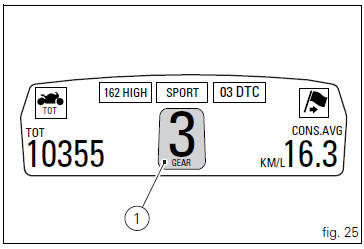
This function displays the gears (1, fig. 25).
The instrument panel receives information and indicates the engaged gear or "n" for neutral.
 Note
Note
In the case of a gear sensor "error", a dash "-" (not flashing) will be displayed.
 Indicator air - air temperature
This function shows the external temperature.
Display limits: -39C ÷ +124C
In the event of a sensor fault (-40C,+125C or
disconnected), a string of dashes "- - -" (not flashing) is ...
 Riding mode set indication
This function indicates the "riding style" set for the vehicle.
Three "riding modes" are available: sport, touring and
urban.
Each riding mode can be changed using the " ...
Other materials:
Key-on/key-off using the red key on the handlebar with the active key
A key-on can be performed by pressing the red key (6) on
the handlebar in the hands free on/off position and in
the presence of the active key (3, fig. 77).
Note
The active key (3, fig. 77) Has a range of approx. 1.5 M,
therefore it must be located within this range.
Key-off can be performed ...
Refitting the cylinder head assemblies
Warning
To prevent oil leaks past the contact area between cylinders and
crankcase, each time the head is removed, cylinder and
piston must be removed as well to clean the mating faces of crankcase and
cylinder and restore the spoiled gaskets and
o-rings and apply again liquid sealant (sect. ...
Rear shock absorber assembly
Special screw
Screw
Nut
Grub screw
Bush (right)
Bush (left)
Screw
Sealing ring
Roller bearing
Linkage (left)
Shock absorber (rear)
Linkage (right)
Spacer
Special screw
Screw
Bush
Ball joint
Rocker arm assembly
Support
Washer
Nut
Screw
Shock absorber ...