
Ducati Diavel Service Manual: Indicator air - air temperature
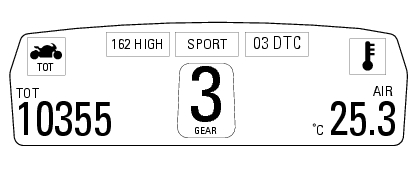
This function shows the external temperature.
Display limits: -39C - +124C
In the event of a sensor fault (-40C, +125C or disconnected), a string of dashes "- - -" (not flashing) is displayed and the "vehicle/engine diagnosis - eobd" light comes on.
Note
When the vehicle is stopped, the engine heat could influence the displayed temperature.
When the detected temperature drops to 4C (39f), the display warns that the formation of ice is possible. The indication turns off when the temperature rises to 6C (43f).
Warning
This warning does not exclude the possibility of icy road sections even at temperatures above 4C (39f); when external temperatures are "low" it is always recommended to ride carefully, particularly on sections that are not exposed to the sun and/or on bridges.
 Indicator trip time - trip time
This function shows the vehicle trip time.
The calculation is made considering the time travelled since the last trip 1
reset. When trip 1 is reset, the value is set to
zero.
The active phase ...
 Engaged gear indicator
This function displays the gears (1).
The dashboard receives information and indicates the engaged gear or "n" for
neutral.
In the case of a gear sensor "error", a dash "-" (not flashing) will ...
Other materials:
Riding style function (riding style change)
This function changes the motorcycle riding style.
Each riding style is associated with a different intervention
level of the traction control (dtc - ducati traction control)
and different engine power and output.
To change the motorcycle riding mode, press the reset
button once (12, fig. 1 ...
Front wheel
Nut
Washer
Left spacer
Sealing ring
Bearing
Front wheel rim
Inner spacer
Screw
Right spacer
Front wheel shaft
Valve
Spare parts catalogue
Diavel abs front and rear wheels
Diavel carbon
abs
front and rear wheels
Important
Bold reference numbers in this section iden ...
Key to wiring diagram
Right-hand handlebar switch
Immobilizer
Hands free relay
Hands free
Front fuse box
Right fan
Left fan
Fan relay
Fuel pump relay
Ride-by-wire relay (etv)
Injection control unit (ems)
Rear fuse box
Data acquisition/diagnosis
Starter motor
Fused solenoid
Battery
Wirin ...