
Ducati Diavel Service Manual: Indicator trip time - trip time
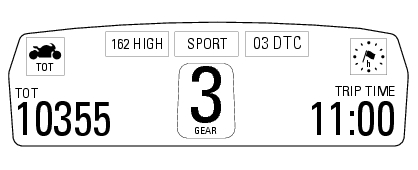
This function shows the vehicle trip time.
The calculation is made considering the time travelled since the last trip 1 reset. When trip 1 is reset, the value is set to zero.
The active phase calculation occurs when the engine is running and the vehicle is stopped (when the vehicle is not moving and the engine is off the time is automatically stopped and restarts when the counting active phase starts again).
When the reading exceeds 511:00 (511 hours and 00 minutes), the meter is reset and automatically starts counting from 0 again.
 Indicator speed avg - average speed
This function shows the average speed of the motorcycle.
The calculation is made considering the distance and time travelled since the
last trip 1 reset. When trip 1 is reset, the
value is set t ...
 Indicator air - air temperature
This function shows the external temperature.
Display limits: -39C - +124C
In the event of a sensor fault (-40C, +125C or disconnected), a string of
dashes "- - -" (not flashing) is displayed an ...
Other materials:
Removing the frame and the lateral footrests
Loosen the two special screws (6) to separate the frame (1) from the lateral
brackets (2) and (3).
On the left side of the vehicle block retaining pins (9) and loosen the nuts (8)
on the right side at the same time.
Slide out the retaining pins (9) and remove the frame (1) from the lateral ...
Removal of the clutch transmission unit
Warning
The manufacturer of the clutch transmission unit (15) advises
against servicing of its internal parts due to the safetycritical
nature of this component.
Incorrect overhaul of these critical safety components can endanger rider and
passenger safety.
The only components that shoul ...
Headlight control
This function allows you to reduce current consumption from
the battery, by automatically managing headlight switchingoff.
At key-on, the high beam and low beam lights are off.
When the engine is started, the low beam lights turn on
automatically; from this moment, "normal" operati ...