
Ducati Diavel Owners Manual: Lcd unit functions
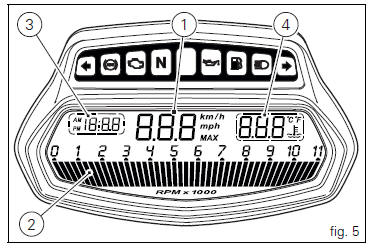
- Speedometer.
Gives road speed.
- Rev counter.
Indicates engine revs per minute.
- Clock.
- Water temperature indicator.
Indicates engine coolant temperature.
 Important
Stop riding if the temperature reaches the maximum value, otherwise the engine might be damaged.
 Instrument panel on handlebar
Lcd.
Neutral light n (green). Illuminates when the gearbox is in neutral.
High beam light (blue).
It turns on to indicate that the high beam lights are on.
Engine oil pressure light ...
 Vehicle speed indicator
this function displays vehicle speed (km/h or mph
depending on the set measurement system).
the instrument panel receives information about the actual
speed and displays the number increased by 5 ...
Other materials:
Tubeless tyres
Front tyre pressure:
2.50 Bar (rider only) - 2.6 Bar (with passenger and/or bags)
rear tyre pressure:
2.50 Bar (rider only) - 2.6 Bar (with passenger and/or bags)
as tyre pressures are affected by changes in temperature
and altitude; check and adjust them whenever you are riding
in areas where ...
Tips for use on the road
Activate the dtc, select level 8 and ride the motorcycle in
your usual style; if the level of dtc intervention seems
excessive, try reducing the setting to levels 7, 6, etc., Until
you find the level that suits you best.
If changes in the grip conditions and/or circuit characteristics
and/or ...
Overhauling the rear wheel
Inspect the condition of the rear wheel.
As the wheel rim has no bearings, it should be supported using the service tool
code 88713.2951.
Note
This service tool can also be used to install the wheel on a balancing
machine.
Overhauling the wheel
Inspect the wheel as described below.
...