
Ducati Diavel Owners Manual: Residual range indication when the service is due
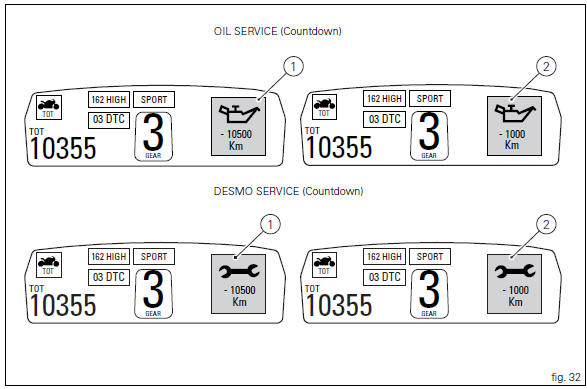
After resetting the first oil service warning (triggered at 1000 km), upon every key-on the system displays the indication of which type of service should be performed next (oil service or desmo service) and the residual range.
A (green) warning (1, fig. 32) Is activated for 2 seconds on every key-on; while 1000 km before the threshold an (amber yellow) warning (2, fig. 32) Is activated for 5 seconds upon every key-on.
 Warning
This message can only be reset by the ducati dealer or authorised service centre that performs the maintenance.
 Maintenance indicator
This function indicates that the vehicle is about to or has
travelled a distance for which an authorised ducati service
centre should be contacted to have the general maintenance
or oil change perf ...
 Indication of range reached for service
When service coupon threshold is achieved, upon every key-
on the system displays the indication of the type of
intervention that is required (oil service or desmo
service).
The (red) warning is ...
Other materials:
Riding style function (riding style change)
This function changes the motorcycle riding style.
Each riding style is associated with a different intervention
level of the traction control (dtc - ducati traction control)
and different engine power and output.
To change the motorcycle riding mode, press the reset
button once (12, fig. 1 ...
Disassembling the water radiator unit
The procedure is the same for both radiators.
Loosen the screws (15), (21) and (25) to remove the air duct (24) from the right
radiator (13).
Undo the screws (12) and (14) to remove the half-fairing (23) from the
radiator.
Radiator inspection
Visually inspect the oil co ...
Start procedure with pin code (no keys)
The motorcycle may be started without keys with a special procedure using the
dashboard and the switches on the
handlebar.
Note
This procedure is only possible if the pin code has been enabled
previously. For security reasons, the pin code is disabled
by default when the vehicle leaves the f ...