
Ducati Diavel Service Manual: Turn indicators not working
Fault codes
Dds: no fault code displayed.
Dashboard: no fault code displayed.
Wiring diagram
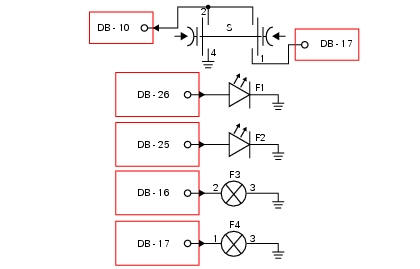
Db dashboard connection, bbs bbs unit connection, s turn indicator button, f1 front left turn indicator, f2 front right turn indicator, f3 rear left turn indicator, f4 rear right turn indicator. 2 On grey button - gr, 1 on red/blue button - r/b, 4 on black button - bk, db 26 white/black w/bk, db 25 green/black - g/bk, bbs 16 white/green - w/g, bbs 17 White/black w/bk.
Location of connections and components
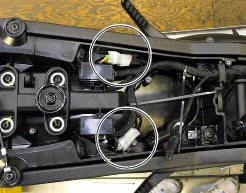
Location of rear turn indicator and number plate light connection.
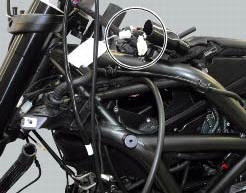
Location of left hand handlebar switchgear set connection.
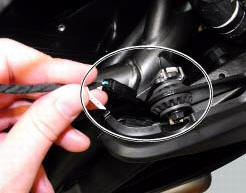
Location of front right turn indicator connection.
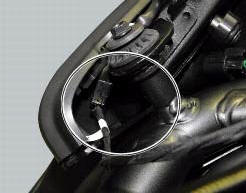
Location of front left turn indicator connection.
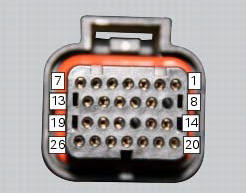
Pin numbering for wiring harness side dashboard connector.
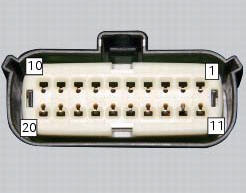
Pin numbering of wiring harness side bbs unit connection.
 Horn not working
Fault codes
Dds: horn diagnosis -> short circuit to ground (s.C. Gnd).
Dashboard: the error "claxon" (horn) is shown on the service display. The eobd
warning light activates.
Wiring diagram
...
 High beam flash not working - start/stop lap function not working
Fault codes
Dds: no fault code displayed.
Dashboard: no fault code displayed.
Wiring diagram
Db dashboard connection, s high beam flash button. 7 Orange - o, 1
red/blue - r/b.
Location of ...
Other materials:
Operating principle and characteristics of the ride-by-wire system
The engine control system of the diavel uses a ride-by-wire system with
motorised throttle valves. This eliminates all
direct connection with metal cables between the throttle grip and the throttle
valves themselves. Cables are used to
rotate the aps potentiometer, which generates an electric ...
Setting menu
This menu is used to enable/disable and set some
motorcycle functions.
To access the "setting menu" press the button (2, fig. 14)
? for 3 seconds.
Note
When within this menu no other function can be
displayed.
Important
For safety reasons, the setting menu can only be
ac ...
Adjusting the rear shock absorber
The rear shock absorber has external commands that enable
you to adjust the setting to suit the load on the motorcycle.
The adjuster (1, fig. 111) Located on the lower connection
holding the shock absorber to the swingarm adjusts the
damping during the rebound phase (return).
The knob (2, f ...