
Ducati Diavel Owners Manual: Indicator speed avg - average speed
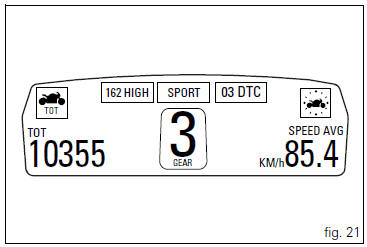
This function shows the average speed of the motorcycle.
The calculation is made considering the distance and time travelled since the last trip 1 reset. When trip 1 is reset, the value is set to zero and the first available value is shown on the display 10 seconds after the reset. Dashes "- -.-" Are shown on the display during the first 10 seconds when the value is not yet available.
The active calculation phase occurs when the engine is running and the vehicle is stopped (moments when the vehicle is not moving and the engine is off are not considered).
The calculated value is displayed increased by 5% to align it with the vehicle indicated speed.
It is possible to change the units of measurement of "speed" (and "distance travelled") from km/h (and km) to mph (and miles) through the "set units" function of the setting menu.
 Indicator cons. - Instantaneous fuel consumption
This function indicates the "instantaneous" fuel consumption.
The calculation is made considering the quantity of fuel used
and the distance travelled during the last second. The datum i ...
 Indicator trip time - trip time
This function shows the vehicle trip time.
The calculation is made considering the time travelled since
the last trip 1 reset. When trip 1 is reset, the value is set to
zero.
The active phase ...
Other materials:
Display background colour (automatic adjustment)
Instrument panel background colour is set automatically
according to exterior lighting conditions.
When sensor detects "poor lighting" (night), it switches to
black background mode; vice versa when a "significant"
lighting is detected (day), it switches to white background
...
Removal of the licence plate holder
Disconnect connector (5) of the number plate holder wiring from the main one.
Release the number plate holder light cable from the ties and the cable grommets
as indicated in sect- 7 - 6, flexible
wiring/hoses positioning, since the cable is together with the rear abs sensor
cable.
...
Refitting the front sprocket
Grease the o-ring (16) and install it on the front sprocket spacer (15).
Fit the spacer, from the o-ring side, on the secondary shaft and drive it fully
home against the inner ring of the bearing.
Check that the splines of the gearbox secondary shaft and the sprocket are in
perfect condi ...