
Ducati Diavel Owners Manual: Front brake lever
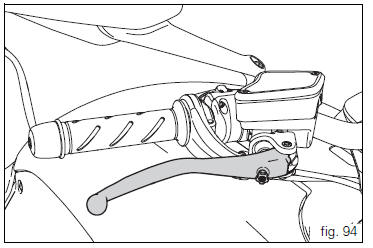
Pull the lever (1, fig. 94) Towards the twistgrip to operate the front brake. The system is hydraulically assisted and you only need to pull the lever gently.
The control lever (1, fig. 94) Features a dial adjuster (2, fig. 94) For lever distance from the twistgrip on handlebar adjustment.
The lever distance can be adjusted through 10 clicks of the dial (2, fig. 94). Turn clockwise to increase lever distance from the twistgrip. Turn the adjuster counter clockwise to decrease lever distance.
 Throttle twistgrip
The twistgrip (1, fig. 93) On the right handlebar opens the
throttles. When released, it will spring back to the initial
position (idling speed).
...
 Rear brake pedal
Push down the pedal (1, fig. 95) To operate the rear brake.
The system is hydraulically controlled.
...
Other materials:
Disassembly of the rear brake control
The brake master cylinder is supplied only as a complete unit; internal
components cannot be replaced.
To disassemble the master cylinder's outer parts, follow the indications given
in the exploded view at the beginning of this
section.
If the bush (10) inside the brake pedal (6) needs to ...
Removing the timing belt driveshaft pulleys
Use the tool code 88713.1805 To hold the driving pulley on the engine
crankcase against rotation.
Important
If this operation is carried out with the engine installed in the frame,
hold the driveshaft pulleys against rotation using the
tool code 88713.2011 Mounted on the alternator cover.
Lo ...
Digital rpm indication function
This function displays the number of rpms for improved accuracy when setting
idle rpm.
To access the function it is necessary to view the ""setting" menu", using
buttons (1) "s" or (2) "t" select the "rpm"
function and press the reset button (3) to confirm.
The display shows the numerical v ...