
Ducati Diavel Service Manual: Hands free
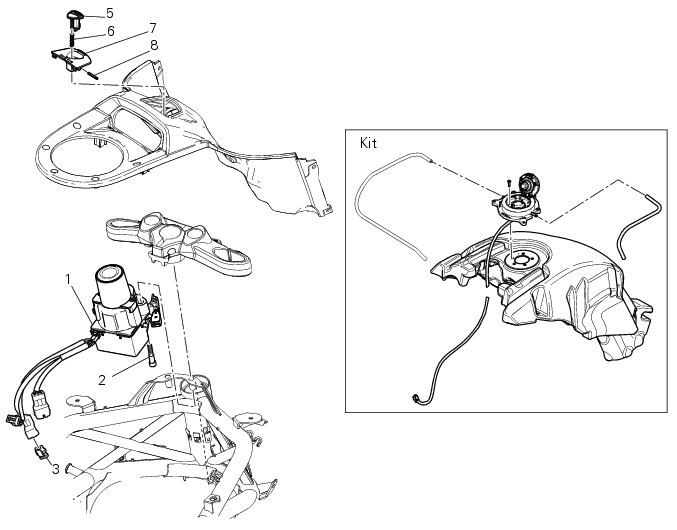
- Hands free
- Special screw
- Plug
- Electric fuel plug
- Button
- Spring
- Frame
- Elastic pin
Spare parts catalogue
Diavel abs handlebar and controls
Diavel carbon abs handlebar and controls
Important
Bold reference numbers in this section identify parts not shown in the figures alongside the text, but which can be found in the exploded view diagram.
 Refitting the clutch transmission unit
Position pipe (4) on the clutch slave cylinder (r).
Position the two seals (19) and tighten the screw (18) to a torque of 23 nm +/-
10% (sect. 3 - 3, Frame torque settings).
Refit the bleed valv ...
 Removing the hands free
Loosen the screws (2) and remove the hands free system (1) from the frame.
...
Other materials:
Clutch lever button
Introduction
The clutch button is located on the clutch lever. Together with the signal
from the side stand button and the neutral signal
generated by the gear sensor (transmitted to the engine control unit over the
can line), the clutch lever position signal is
used to enable or disable engi ...
Removal of the swingarm
Before removing the parts in question, you must first carry out the following
operations:
Remove the rear wheel eccentric hub as described in chapter "removal of the
rear wheel eccentric hub and rear wheel
shaft" of this section.
Loosen screws (7) and remove the hose grommets (13), (15) ...
Tool kit and accessories
The tool kit (2) is located under the seat (1) while the owner’s
manual is housed in the compartment under the seat.
The tool kit includes:
Fuse pliers;
Two helmet anti-theft cables;
Screwdriver;
Screwdriver handle;
14/16 Mm box wrench;
6 Mm rod;
3 Mm allen wrench;
4 Mm allen ...