
Ducati Diavel Service Manual: Reassembly of the control unit
Insert the control unit (4) into the protecting sheath (5) and position it on the airbox.

Position the relay supporting bracket (2) by starting and tightening the screws (1) to a torque of 6 nm +/- 10% (sect. 3 - 3, Frame torque settings), and connect the control unit connectors (3).
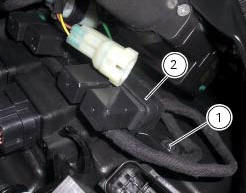

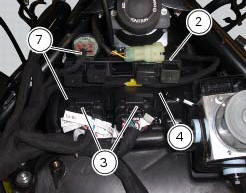

 Removal of the control unit
Loosen the screws (1) and remove the relay supporting bracket (2), disconnect
the connectors (3) and remove the control
unit (4) from the vehicle.
...
 Fuel system circuit
The fuel system circuit consists of:
An electric pump, driven by the injection relay, which is in turn
controlled by the ecu (engine control unit)
A fuel filter
A pressure regulator
Two i ...
Other materials:
How to switch the dashboard on
The dashboard may switched on either from the on/off switch on the handlebar
or from the button on the hands free
system.
With the engine off, the on/off switch is turned to "run off".
With the motorcycle and dashboard off, the on/off switch is turned to "run
off".
To switch the dash ...
Operating principle
The ducati abs brake system manages the front and rear brakes separately. A
pulse generator (phonic wheel), with a
ring of slots, is fixed onto each wheel. On the left calliper mounting bracket
of the front fork and on the rear brake calliper
holder plate are hall effect sensors which detect t ...
Indicator trip time - trip time
This function shows the vehicle trip time.
The calculation is made considering the time travelled since the last trip 1
reset. When trip 1 is reset, the value is set to
zero.
The active phase calculation occurs when the engine is running and the vehicle
is stopped (when the vehicle is not ...