
Ducati Diavel Owners Manual: Indication if the lap function is active/not active
This function indicates if "lap" function (lap number) is active.
When "lap" is not lit up, this means that the function has been switched off.
The "lap" function can be activated using the "lap" function of the setting menu.
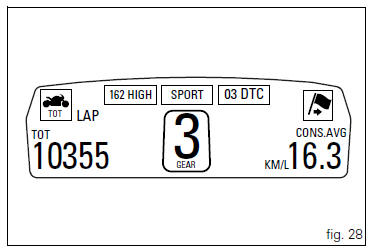
 Riding mode set indication
This function indicates the "riding style" set for the vehicle.
Three "riding modes" are available: sport, touring and
urban.
Each riding mode can be changed using the " ...
 Riding style function (riding style change)
This function changes the motorcycle riding style.
Each riding style is associated with a different intervention
level of the traction control (dtc - ducati traction control)
and different engine ...
Other materials:
Steering head: front fork
Screw
Screw
Steering head
Bottom yoke
Left fork leg assembly
Right fork leg assembly
Counter nut
Damper assembly
Bush
Spring
Preload tube
Collar
Washer
Top cap assembly
Screw
Washer
Adjuster screw
Special washer
Fork tube + calliper unit
Dust cap
Sealin ...
Operations to be carried out by the dealer
List of operations to be performed at 1000 km
Reading of the error memory with dds on the engine control units,
vehicle and abs
Change the engine oil
Change the engine oil filter
Check the indicators and lighting
Check the safety devices (side ...
Refitting the fuel tank fairings
Make sure that the following components are fitted on the tank fairing (22):
Spacers (18);
Seals (20).
Fit the clips (19) to the central cover (22) at the positions shown,
inserting the tabs (h) into the slots (l).
Apply threadlocker to the screws (14).
Place the tank fairing (22) ...