
Ducati Diavel Service Manual: Lap registration function
This function describes the "lap" time registration.
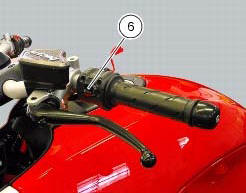
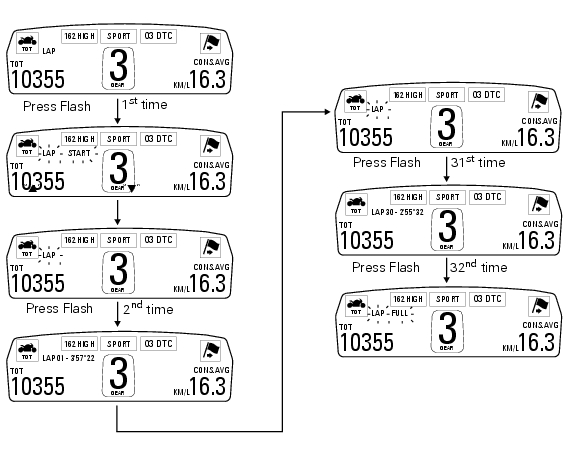
If the function is activated (see "lap activation/deactivation description), the lap time can be registered as follows: pressing the flash headlight button (6) the first time starts the "lap timer" for the first lap, and the dashboard shows the message "lap-start" flashing for 4 seconds, and then returns to the "previous" display; from this moment, each time that the flash (6) is pressed the display automatically shows the lap number and lap time for 10 seconds and then returns to the "previous" display.
You can save a maximum of 30 laps in the memory.
Once the memory is full, the dashboard no longer stores lap times when the flash headlight button (6) is pressed, and the flashing message "lap-full" is shown on the display for 4 seconds until the times are reset.
When the lap function is set disabled, the current "lap" is not stored.
If the lap function is active and suddenly the motorcycle is suddenly turned off (key-off), the function will be automatically disabled (even if the lap timer was active, the current "lap" is not stored).
If the time is never "stopped", it will roll over upon reaching 9 minutes, 59 seconds and 99 hundredths; the lap timer starts counting from 0 (zero) and will keep running until the function is disabled.
If however the lap function is switched on and the memory has not been cleared, but fewer than 30 laps have been saved (e.G. 18 Laps), the dashboard will store any remaining laps until the memory is full (in this case, it will store an additional 12 laps).
This function only displays the times for the lap being registered; but other data are also saved (max speed and max rpm) for viewing at a later date in the "lap data" function (stored lap display).
 Lap activation/deactivation function (lap time)
This function activates and deactivates the lap function (lap time).
To access the function it is necessary to view the ""setting" menu", using
buttons (1) "s" or (2) "t" select the "lap"
functi ...
 Stored lap display function
This function displays the stored laps.
To access the function it is necessary to view the ""setting" menu", using
buttons (1) "s" or (2) "t" select the "lap"
function and press the reset button ...
Other materials:
Riding modes
The rider may select between four different riding modes (sport, touring,
urban and enduro) from the dashboard and via
the "turn indicator reset" button (3). Each riding mode contains settings for
the following:
The dtc set-up (sect. 6 - 7 "Dtc (ducati traction control) setting
function" ...
Routing of wiring on frame
The routing of the wiring has been optimised to ensure the minimum
obstruction.
Each section is designed to prevent interference with parts that might damage
wires or cause operating failures when
riding. The plates on the following pages show the origins ("0" points) for
correct re-routin ...
Checking and overhauling the components
Clearance between the clutch drum and friction plates
Insert a friction plate (e) in the clutch drum (f) and measure the clearance
(s) with a feeler gauge.
Clearance "s" must not exceed 0.6 Mm.
If it does, renew the plates and, if necessary, the clutch drum.
Overhaul of the clutch plat ...