
Ducati Diavel Service Manual: Refitting the swingarm
Apply the recommended threadlocker to the screws (7).
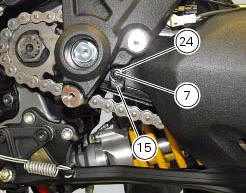
Install the lower chain guard (15) on the swingarm (8), fastening it with the screws (7): tighten the screws (7) to a torque of 4 nm +/- 10% (sect. 3 - 3, Frame torque settings).
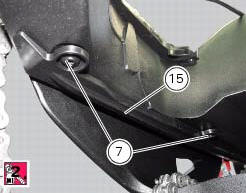
Locate the swingarm (8) on the frame.
Lubricate with recommended grease the swingarm shaft (1) with the screw (3) and insert it fully home on the frame and through the brackets (36).
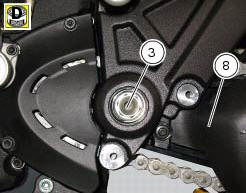
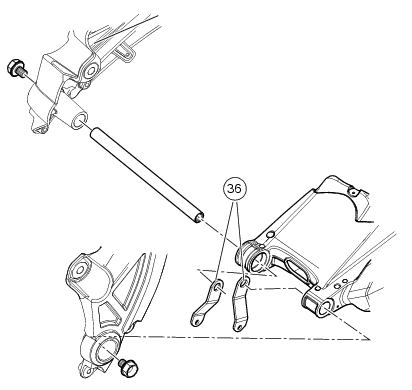
On the bike opposite side fix the swingarm shaft (1) with the screw (3) after having lubricated it with recommended grease, and fit the washer (2) between frame and swingarm.
Tighten the screw (3) to the torque of 72 nm +/- 5% (sect. 3 - 3, Frame torque settings).
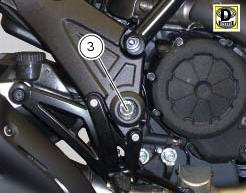
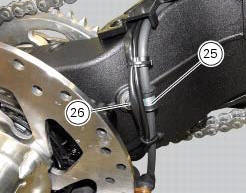
Position the rear brake hose, the rear speed sensor cable, and the rear wiring on the swingarm, by starting the screws (26) of the cable grommet (25).
Tighten the screw (26) to a torque of 8 nm +/- 10% (sect. 3 - 3, Frame torque settings).
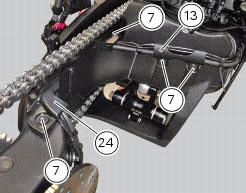
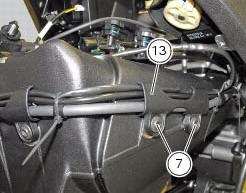
Refit the upper chain slider (24) and the hose guide (13) and tighten the screws (7) to a torque of 4 nm +/- 10% (sect. 3 - 3, Frame torque settings).
Refit the rear wheel eccentric hub as described in chapter "refitting the rear wheel eccentric hub and rear wheel shaft" of this section.
 Overhauling the rear swingarm
Inside the swingarm (8), in correspondence with the pivot point on the frame,
there is a pair of ball bearings (10) and a
spacer (11) on the rh side, and a pair of roller bearings (6), with sealing ...
 Final drive
Circlip
Nut
Washer
Nut
Rear sprocket flange
Cush drive bush
Inner ring
Chain
Spacer
Chain cover
Screw
Nut
Lock washer
Front sprocket
Spacer
O-ring
Rear sprocket
...
Other materials:
Limitations
This emission control system warranty shall not cover any
of the following:
Repair or replacement required as a result of
Accident,
Misuse,
Repairs improperly performed or replacements improperly
installed,
Use of replacement parts or accessories not conforming
to ducati specifi ...
Refitting the rear brake calliper
When replacing the brake pipes (33) or removing one of the rear braking
system components, pay special attention to the
position of the couplings on the pump and the calliper.
Warning
If incorrectly positioned, the hose can affect brake operation and
foul moving parts. Position the hose as sh ...
Refitting the radiator
The reassembly procedure is the same for both radiators.
Check for the nuts with clips (8).
Refit the rh radiator (13) on the frame and tighten the screws (4) and (5)
with the spacers (6) to a torque of 10 nm
+/-10% (sect. 3 - 3, Frame torque settings).
Connect the connections of ...