
Ducati Diavel Service Manual: Removing the electrical components support

Remove the following elements located inside the electrical components support:
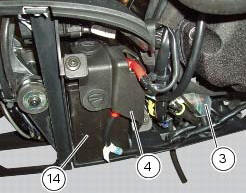
- The battery fixing bracket (4) and the battery (14) as specified under section 6 - 2, battery;
- The voltage regulator (3) as specified under section 6 - 2,rectifier-regulator;
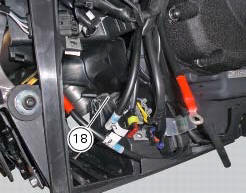
- The solenoid starter (18) as specified under section 6 - 3,solenoid starter;
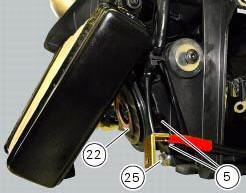
Remove the connector (a) of horn (22) from the main wiring.
Undo the screw (25) and remove the horn (22) from the vehicle.
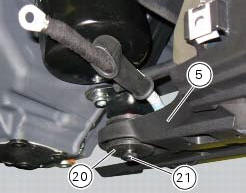
Loosen screws (11) and (21) and recover the washer (10) and the spacer (20).
Remove the electrical components support (5).
Pay attention to the main wiring branch and to any other wiring inside of it.
Refer to the tables reported in this section for the components position.
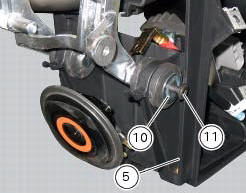
 Electrical components support
Clip
Screw
Voltage regulator
Battery fixing bracket
Battery support
Vibration damper mount
Hose clip
Vibration damper mount
Clip
Washer
Screw
Cover
Cable grommet
Batte ...
 Reassembling the electrical components support
Check the presence of clips (1), (9) and (24) on the support (5).
Check the presence of rubber pads (6) and (8) and of cable grommet (7).
Check that the voltage regulator (3) and the solenoi ...
Other materials:
Reassembly of the oil pump
Check that the circlip (3) and tongue (13) are present on the pump.
Fit the pump drive gear (12) on to the oil pump and secure it by installing the
circlip (6) in its groove.
Insert the by-pass valve pump (17), the spring (16) and screw the plug (14).
Tighten the plug (14) to a torque of ...
Refitting the clutch transmission unit
Position pipe (4) on the clutch slave cylinder (r).
Position the two seals (19) and tighten the screw (18) to a torque of 23 nm +/-
10% (sect. 3 - 3, Frame torque settings).
Refit the bleed valve (17) and the dust gaiter (16).
To position the pipe retaining clamps (4) refer to the table on ...
Refitting the hands free
Reassembly is a reversal of the removal procedure: in particular apply
prescribed threadlocker to screws (2) and tighten
them to a torque of 20 nm +/- 10% (sect. 3 - 3, Frame torque settings).
If the hands free button has been previously removed, when refitting it insert
the spring (6) on pi ...