
Ducati Diavel Owners Manual: Adjusting the position of the gearchange and rear brake pedals
The position of the gearchange and rear brake pedals in relation to the footrests can be adjusted to suit the requirements of the rider.
Adjust the pedals as follows:
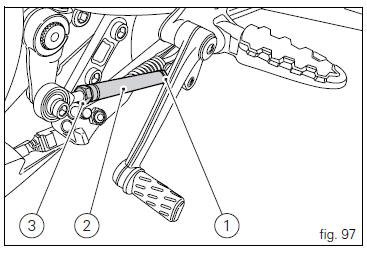
Gear change pedal (fig. 97) Hold the linkage (1) and slacken the lock nuts (2) and (3).
 Note
Note
Nut (2) has a left-hand thread.
Fit an open-end wrench to hexagonal element of linkage (1) and rotate until setting pedal in the desired position.
Tighten both check nuts onto linkage.
Rear brake pedal
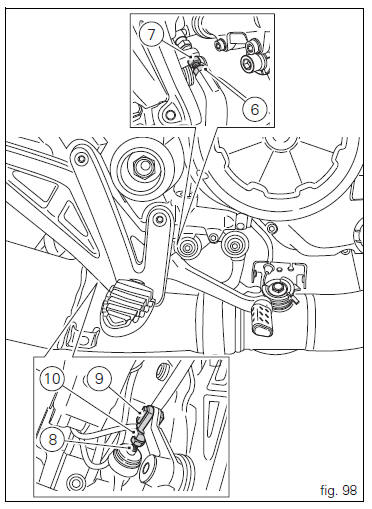
Loosen counter nut (7).
Turn pedal stroke adjusting screw (6) until pedal is in the desired position.
Tighten the counter nut (7).
Operate the pedal by hand to check that there is 1.5 To 2 mm of freeplay before the brake bites.
If not, adjust the length of the master cylinder pushrod as follows.
Slacken off the counter nut (10) on the pushrod.
Screw the pushrod (8) into the front fork (9) to increase the freeplay, or screw it out to reduce it.
Tighten the counter nut (10) and recheck the pedal freeplay.
 Gear change pedal
When released, the gear change pedal (1, fig. 96)
Automatically returns to rest position n in the centre. This is
indicated by the instrument panel light n (2, fig. 4) Coming on.
The pedal can be ...

Other materials:
Removal of the evaporative emissions canister
Loosen the screws (9) securing the plate (8) to the tank.
Slightly pull the plate (8) with the canister (13), remove the clamps (3) and
(12) and connect hoses (7) and (14).
Release the retainers (b) of the plate (8) to remove it from the canister
(13).
Disconnect the hose ...
Removal of the front footrests
Note
The removal of the front footrests is described only for the right one (2)
but it is the same also for the left one.
Remove the circlip (5) by releasing the pin (3).
Slide the pin (3) off the frame by supporting the footrest (2).
Slide off the footrest (2) from its seat and collect th ...
Refitting the front footrests
Note
The assembly of the front footrests is described only for the right one
(2) but it is the same also for the left one.
Place the spring (4) bringing the end (a) onto the footrest (2).
Place the footrest (2) in the correct position, by inserting the end (c) of the
spring (4) in the hole ...