
Ducati Diavel Service Manual: Rectifier-regulator
The rectifier (1) is placed in the electrical components compartment.
The rectifier/regulator consists of an aluminium casing containing the diodes that rectify the current produced by the alternator. It also contains an electronic device that regulates the current supplied by the alternator in accordance with battery voltage.
If the battery is drained, the current has the value necessary to restore optimum operating conditions of the battery. In contrast, if the battery is fully charged, the current value will be lower.
Note
Control the charger current by using the dds diagnosis instrument (sect. 6 - 11, Diagnostic instruments).
Removal of the regulator 
Undo the two fixing screws (1) of the voltage regulator (2) and remove it together with them.
Important
Do not disconnect the battery cables when engine is running because this would cause irreparable damage to the regulator.
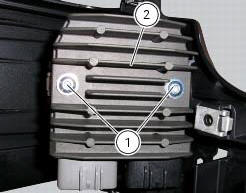
Refitting the regulator
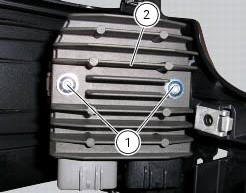
Position the regulator (1) on the support.
Tighten the screws (1) to a torque of 10 nm +/- 10% (sect. 3 - 3, Frame torque settings).
Important
Do not disconnect the battery cables when engine is running because this would cause irreparable damage to the regulator.

Regulator fuse
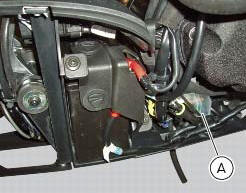
The 30 a fuse is located inside the solenoid starter in the electrical components compartment.

Remove the fuse cap (a) to reach it.
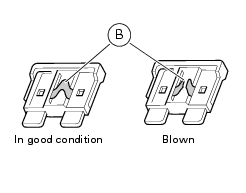
A blown fuse can be identified by breakage of the inner filament (b).
Important
To avoid possible short circuits, replace the fuse in key off condition.
Warning
Never use a fuse with a rating other than the specified value. Failure to observe this rule may damage the electric system or even cause fire.

 Alternator
It is equipped with a 12 v, 430 w generator, consisting of a fixed element
(stator, a) located on the generator cover and
of a movable element (rotor, b) fixed to the crankshaft.
Note
To chec ...
 Electric starting system
Note
The references of the elements listed below are those of the "wiring
diagram", sect. 6 -1.
Electric starting system
The key components of the electric starting system are a solenoid (6) and ...
Other materials:
Clutch cover
Clutch-side crankcase cover
Screw
Screw
Oil level sight glass
Screw
Plate
Bush
Sealing ring
Shim washer
Circlip
O-ring
Locating bush
O-ring
Plug
Sealing washer
Screw
Plug
Panel
Spare parts catalogue
Diavel abs clutch-side crankcase cover
Diavel carbon
a ...
Oxygen sensors
Introduction
An on-off type oxygen sensor (in normal operating conditions, the voltage
generated by the sensors switches between a
value close to 1v and a value close to 0v) is mounted on each of the exhaust
manifold of the diavel.
Each oxygen sensor has its own internal heater, which recei ...
Engine temperature sensor
Introduction
The engine control system on the diavel uses a sensor that measures the
temperature of the coolant (engine
temperature). This sensor has a resistance of ntc type (negative temperature
coefficient), that reduces its own value
when the temperature increases. The engine temperature ...