
Ducati Diavel Service Manual: Removal of the air filters

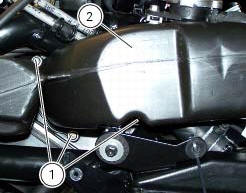
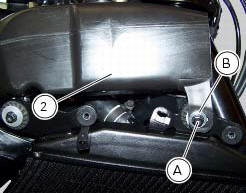
Work on the vehicle right side, loosen screws (3) that secure the intake duct (2) to the airbox, and the radiator retaining screw (a); recover the washer (b).
Remove the intake duct (2).
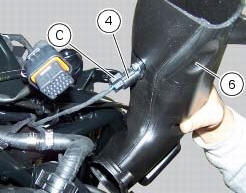
Proceed in the same way to remove the lh intake duct (6), and disconnect the connector (c) of the air temperature sensor (4).
Pull out the filter cartridge (1) from the seat in the airbox.
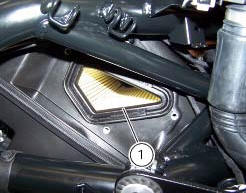
 Air intake
Air filter
Right air duct
Screw
Air temperature sensor
Screw
Left air duct
Sealing washer
Threaded insert
Spacer
Clamp
Breather hose
Spare parts catalogue
Diavel abs air ...
 Refitting the air filters
Apply universal sealant in the air duct (2) and (6) groove (d).
Fit seal (7) in the groove (d) having care to place it correctly in the relevant
seat so as to avoid abnormal wrinkles.
Pull o ...
Other materials:
Refitting the shock absorber support
If you had removed them, apply recommended grease on the threads of the
adjusters (4) and the ring nuts (3) having
care not to have grease on the surface (c) of the adjusters.
Tighten the adjusters on the ring nut side opposite to that featuring flats
until bringing the surfaces as close as ...
Reporting of safety defects
If you believe that your vehicle has a defect which could
cause a crash or could cause injury or death, you should
immediately inform the national highway traffic safety
administration (nhtsa) in addition to notifying ducati north
america. If nhtsa receives similar complaints, it may open
an in ...
Refitting the airbox and throttle body
Position the filter box (1).
Operate on the vehicle lh side, connect connector (f) of the tps/div motor.
Operating on the right side of the vehicle, connect connector (e) from the
aps sensor.
Check for the vibration dampers (20) on the map sensor supporting bracket
(19).
Insert t ...