
Ducati Diavel Service Manual: Default function (resetting ducati default parameters)
This function resets the parameters set by ducati for each riding style.
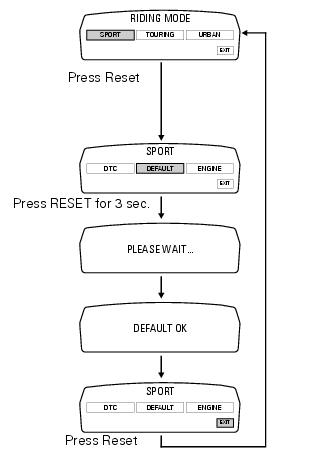
To access the function it is necessary to view the ""setting" menu", using buttons (1) "s" or (2) "t" select the "riding mode" function and press the reset button (3) to enter the following page.
Use button (1) "s" or (2) "t" to select the riding mode to be reset to default (initial) parameters and press the button (3) to access the next page. Now, using button (1) "s" or (2) "t" select "default" indication.
To restore original default parameters, press and hold the reset button (3) for 3 seconds.
For the parameter reset, approx. 3 Seconds are needed during which "please wait…" will appear on the display; at the end of the procedure, "default ok" will appear on the display to indicate that the parameters were reset.
Important
This procedure restores the parameters for all riding styles.
To exit the setting function, press the reset button (3) when "exit" is highlighted.
 Engine setting function (engine power control)
This function customises engine power and output.
To access the function it is necessary to view the ""setting" menu", using
buttons (1) "s" or (2) "t" select the "riding
mode" function and pres ...
 Menu 2 on/off function
This function turns off and back on the menu 2.
If menu 2 is disabled, the functions for average fuel consumption (cons.Avg),
instantaneous fuel consumption (cons.),
Average speed (speed avg), t ...
Other materials:
Battery
Battery safety rules
Warning
Before carrying out any operations on the battery, keep in mind the
safety standards (sect. 1 - 3, General safety rules).
When under charge, batteries produce explosive gases. Keep batteries away from
heat sources, sparks or open flames.
Instructions for use
T ...
Turn indicators not working
Fault codes
Dds: no fault code displayed.
Dashboard: no fault code displayed.
Wiring diagram
Db dashboard connection, bbs bbs unit connection, s turn indicator button, f1
front left turn indicator, f2 front right
turn indicator, f3 rear left turn indicator, f4 rear right turn indicator. ...
Stored lap display function
This function displays the stored laps.
To access the function it is necessary to view the "setting" menu page 48, using
button (1, fig. 14) ?"" or (2, fig.
14) ?" " select the "lap" function and
press the reset button
(12, fig. 12) To go to next pag ...