
Ducati Diavel Owners Manual: Digital rpm indication function
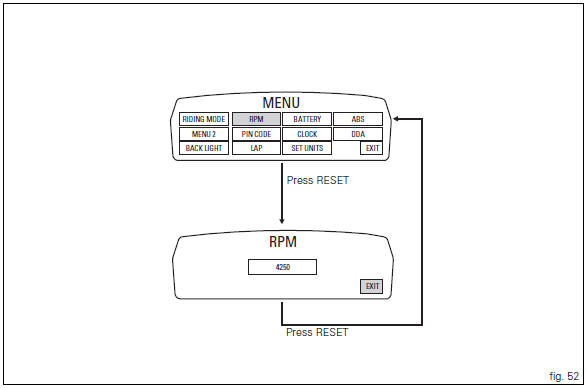
This function displays the number of rpms for improved accuracy when setting idle rpm.
To access the function it is necessary to view the "setting" menu page 48, using
button (1, fig. 14) ?"
" or (2, fig. 14) ?" " select the "rpm" function and
press the reset button
(12, fig. 12) To confirm.
The display shows the numerical value of the rpm with a precision of 50 rpm.
To exit the setting function, press the reset button (12, fig.
12) Where "exit" is highlighted.
 Backlighting setting function for the instrument panel on Handlebar -
dashboard 2
Backlighting setting function for the instrument panel on Handlebar -
dashboard 2
This function allows backlighting setting of the instrument
panel on handlebar.
To access the function it is necessary to view the "setting" menu page 48, using
button (1, fig. 14) ?&q ...
 Lap activation/deactivation function (lap time)
This function activates and deactivates the lap function (lap
time).
To access the function it is necessary to view the "setting" menu page 48, using
button (1, fig. 14) ?"
&quo ...
Other materials:
Explanation of the function of the ride-by-wire system
Mechanism
Via metal cables, the throttle grip operates a roller mounted on one end of a
spindle located near the horizontal cylinder
throttle valve spindle.
The aps sensor, which measures the position of the throttle grip itself, is
mounted on the opposite end of this spindle.
A mechanic ...
Vehicle speed indicator
this function displays vehicle speed (km/h or mph
depending on the set measurement system).
the instrument panel receives information about the actual
speed and displays the number increased by 5%.
maximum speed displayed is 299 km/h (186 mph).
over 299 km/h (186 mph) a series of dashes w ...
Removing the valves
Raise the rocker arm (3) and remove the opening shim (5) from the valves with
a pair of pliers.
Push down the closing rocker arms (16) and (4) and the closing shim (7).
Remove the half rings (6) from the valves with a magnetic screwdriver. Extract
the closing shims (7) from the valve ...