
Ducati Diavel Service Manual: Lcd unit functions
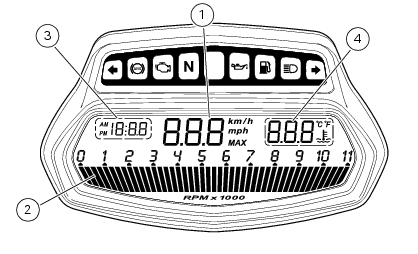
- Speedometer.
Gives road speed
- Rev counter.
Indicates engine revs per minute.
- Clock.
- Water temperature indicator.
Indicates engine coolant temperature.
Important
Stop riding if the temperature reaches the maximum value, otherwise the engine might be damaged.
 Dashboard system
The vehicle is equipped with two dashboards: an lcd (1) located on the
handlebar containing the key indications (speed,
rpm, engine coolant temperature, and clock) and a tft colour display (2) loca ...
 Vehicle speed indicator
This function displays vehicle speed (km/h or mph depending on the set
measurement system).
The dashboard receives information about the actual speed and displays the
number increased by 5%.
...
Other materials:
Checking valve lift
Set the engine to the configuration described for the "checking and adjusting
the valve clearances", previously indicated.
Position the tool 88765.1518 On the cylinder head: the part marked "a" should be
on the intake side and the part
marked "s" should be on the exhaust side.
Seat the pl ...
Refitting the swingarm
Apply the recommended threadlocker to the screws (7).
Install the lower chain guard (15) on the swingarm (8), fastening it with the
screws (7): tighten the screws (7) to a torque
of 4 nm +/- 10% (sect. 3 - 3, Frame torque settings).
Locate the swingarm (8) on the frame.
Lubricate with ...
Refitting the silencer
Position the silencer guard (41) and fix it by starting the screws (40).
Tighten the screws (40) to a torque of 8 nm +/- 10% (sect. 3 - 3, Frame torque
settings).
Insert the silencer (4) into the central exhaust pipe (26), and fix it to the
vehicle by starting the screw (1).
Hold the ...