
Ducati Diavel Service Manual: Replacing the rear phonic wheel sensor
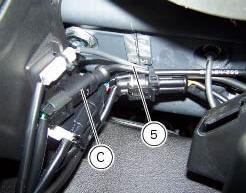
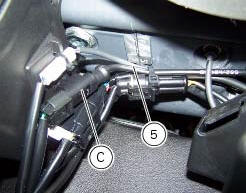
Disconnect the rear abs sensor (5) connector (c) from the main electric wiring.
Open all the retainer clamps of the rear abs sensor cable (5): refer to table of sect. 7 - 6, Flexible wiring/hoses positioning.
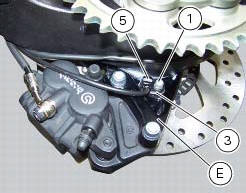
Remove the rear abs sensor (5) from its seat on the rear calliper mounting bracket (e), undoing the retaining screw (1) and collect the calibrated gasket (3).
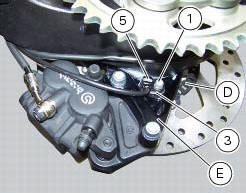
Before refitting, make sure that the contact parts between the rear abs sensor (5) and its seat are not damaged and are perfectly clean.
Fit the new rear abs sensor (5) on its seat inserting the screw (1).
Check the air gap between the new rear abs sensor (5) and the rear phonic wheel (d) as indicated in sect. 7 - 7, Adjusting of the air-gap phonic wheel sensor.
Fix the sensor to the calliper holder bracket tightening the screw (1) to a torque of 10 nm +/- 10% (sect. 3 - 3, Frame torque settings).
Connect the connector (c) to the main wiring.
Restore all the retainer clamps of the rear abs sensor cable (5): refer to table of sect. 7 - 6, Flexible wiring/hoses positioning.


 Replacing the front phonic wheel sensor
Disconnect the front abs sensor (2) connector (a) from the main electric
wiring.
Open all the retainer clamps of the front abs sensor cable (2): refer to table
of sect. 7 - 6, Flexible wiri ...
 Removing of the abs control unit
Drain the hydraulic fluid that is inside the front and rear braking system
tubes by disconnecting them from the master
cylinder and the calliper (sect. 4 -3, Changing the brake fluid).
Disco ...
Other materials:
Engine setting function (engine power control)
This function customises engine power and output.
To access the function it is necessary to view the "setting" menu page 48, using
button (1, fig. 14) ?"
"or (2, fig. 14) ?" "select the "riding mode"function
and press the
reset button (12, fig. 12) T ...
Replacing the high and low beam bulbs
Before replacing a burnt-out bulb, make sure that the new
bulb complies with the voltage and wattage specified in the
"wiring diagram", page 179. Always test the new bulb
before refitting any parts you have removed.
Fig. 150 Shows the locations of the low beam bulbs (lo), high
beam ...
Reassembling the water radiator unit
The procedure is the same for both radiators.
Check the presence of clips (1) at the positions of the external coolant
radiator cover (23).
If removed, fit the front turn indicator (32) on the cover (23) and tighten the
screws (27) to 2 nm +/- 10% (sect. 3 - 3,
Frame torque settings).
No ...