
Ducati Diavel Service Manual: Residual range indication when the service is due
After resetting the first oil service warning (triggered at 1000 km), upon every key-on the system displays the indication of which type of service should be performed next (oil service or desmo service) and the residual range.
A (green) warning (1) is activated for 2 seconds on every key-on; while 1000 km before the threshold an (amber yellow) warning (2) is activated for 5 seconds upon every key-on.
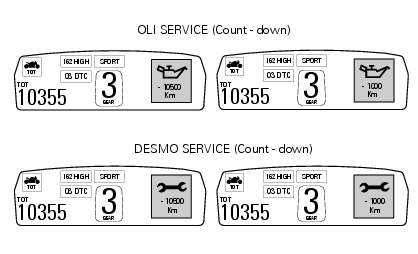
 First warning - oil service 1000 km
The first warning is activated at 1000 km (600 miles) of odometer reading.
The (red) warning is activated as a large icon for 10 seconds upon every key-on
(1) then as a small warning that
remain ...
 Indication of range reached for service
When service coupon threshold is achieved, upon every key-on the system
displays the indication of the type of
intervention that is required (oil service or desmo service).
The (red) warning is ...
Other materials:
Water radiators
Clip nut
Spacer
Vibration damper mount
Screw
Screw
Spacer
Vibration damper mount
Clip nut
Bush
Spacer
Rear sprocket
Screw
Water radiator (right)
Screw
Screw
Air deflector (right)
Special screw
Electro-fan
Screw
Vibration damper mount
Screw
Plug
Half ...
"Parking" function
This function activates the "parkin"h mode.
The "parkin"h function activates the front and rear parking
lights when the vehicle is turned off so it is visible when
parked.
The function is activated by pressing the button (2, fig. 14)
?"´" for 3 seconds du ...
Refitting the cylinder head assemblies
Warning
To prevent oil leaks past the contact area between cylinders and
crankcase, each time the head is removed, cylinder and
piston must be removed as well to clean the mating faces of crankcase and
cylinder and restore the spoiled gaskets and
o-rings and apply again liquid sealant (sect. ...