
Ducati Diavel Service Manual: Riding mode customisation
This function customises each riding style.
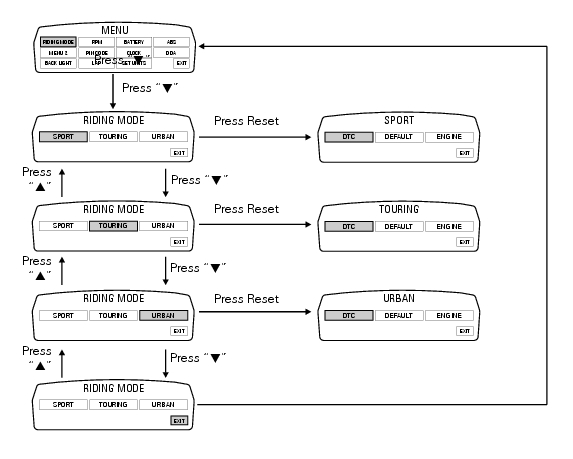
To access the function it is necessary to view the ""setting" menu", using buttons (1) "s" or (2) "t" select the "riding mode" function and press the reset button (3) to enter the following page.
When accessing the function, the three riding modes appear on the display; to customise the parameters, use buttons (1) "s" or (2) "t" to select the riding mode to be modified and press reset (3) to confirm.
The parameters that can be "customised" are "dtc" (ducati traction control) and '"engine".
Any parameter change made is saved in the memory also after a battery-off.
To modify the dtc parameters see the paragraph "dtc (ducati traction control) setting function".
To modify the engine parameters see the paragraph "engine setting function (engine power control)".
The parameters set by ducati for each individual riding style can be restored with the "default" function.
To reset the "default" parameters see paragraph "default function (resetting ducati default parameters)".
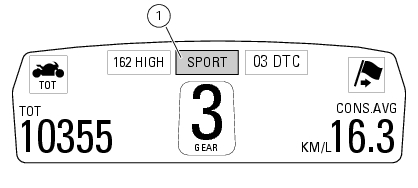
If the parameters have not been modified (customised) or are reset using the "default" function, when you quit the setting menu, in the "main" screen, the "background" indicating the riding style (sport, touring or urban) becomes blue (1).
Changes should only be made to the parameters by people who are experts in motorcycle setup; if the parameters are changed accidentally, use the "default function (resetting ducati default parameters)" to reset the parameters.
 Setting menu
This menu is used to enable/disable and set some motorcycle functions.
To access the "setting menu" press and hold button (2) "t" for 3 seconds.
Note
When within this menu no other function can b ...
 Dtc (ducati traction control) setting function
This function allows you to customise the level of dtc intervention (ducati
traction control) or disable it for every riding
mode.
To access the function it is necessary to view the ""setting" m ...
Other materials:
Removal of the front mudguard
Undo the screw (7) and remove the front brake lines (a) from the hose grommet
(4).
Undo and remove the special retaining screws (5): keep the spacers (6).
Remove the front mudguard (1).
Warning
The version provided with carbon mudguards features nylon washers
instead of the spacers (6) ...
Rear shock absorber assembly
Special screw
Screw
Nut
Grub screw
Bush (right)
Bush (left)
Screw
Sealing ring
Roller bearing
Linkage (left)
Shock absorber (rear)
Linkage (right)
Spacer
Special screw
Screw
Bush
Ball joint
Rocker arm assembly
Support
Washer
Nut
Screw
Shock absorber ...
Reassembly of the control unit
Insert the control unit (4) into the protecting sheath (5) and position it on
the airbox.
Position the relay supporting bracket (2) by starting and tightening the
screws (1) to a torque of 6 nm +/- 10% (sect. 3 -
3, Frame torque settings), and connect the control unit connectors (3).
...