
Ducati Diavel Owners Manual: Beam setting
When checking beam setting, put the motorcycle upright.
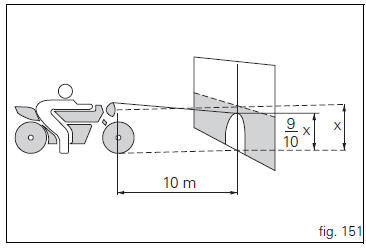
Tyres should be inflated at the correct pressure and one person should be sitting astride the motorcycle, keeping it at right angles to its longitudinal axis. Place the motorcycle opposite a wall or a screen, 10 meters apart from it, draw a horizontal line on the wall at the height of the centre of the headlight and a vertical one in line with the longitudinal axis of the motorcycle.
If possible, perform this check in dim light.
Switch on the low beam headlight.
The height of the upper limit between the dark area and the lit area must not be more than nine tenths of the height of the centre of the headlamp from the ground.
 Note
Note
The procedure described here is in compliance with the italian standard establishing the maximum height of the light beam.
Owners in other countries should adapt this procedure to the regulations in force in the country where the motorcycle is used.
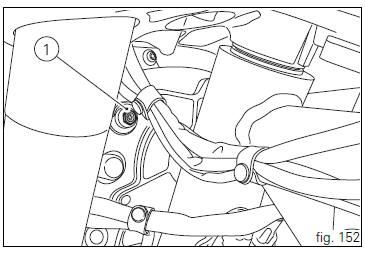
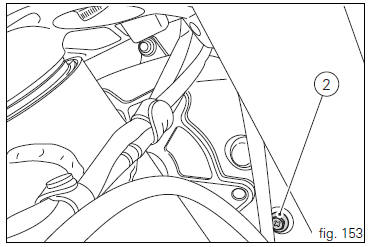
To adjust the headlight beam vertically, turn the screws (1), for horizontal adjustment, turn the screw (2).
 Replacing the high and low beam bulbs
Before replacing a burnt-out bulb, make sure that the new
bulb complies with the voltage and wattage specified in the
"wiring diagram", page 179. Always test the new bulb
before refitting ...
 Rear-view mirror adjustment
The rear-view mirror can be adjusted manually by pressing
points (a).
...
Other materials:
Indicator trip time - trip time
This function shows the vehicle trip time.
The calculation is made considering the time travelled since the last trip 1
reset. When trip 1 is reset, the value is set to
zero.
The active phase calculation occurs when the engine is running and the vehicle
is stopped (when the vehicle is not ...
Removing the valves
Raise the rocker arm (3) and remove the opening shim (5) from the valves with
a pair of pliers.
Push down the closing rocker arms (16) and (4) and the closing shim (7).
Remove the half rings (6) from the valves with a magnetic screwdriver. Extract
the closing shims (7) from the valve ...
Abs disabling function
This function disables or enables the abs.
To access the function it is necessary to view the "setting" menu page 48, using
button (1, fig. 14) ?"
" or (2, fig. 14) ?"" select the "abs" function and
press the reset button
(12, fig. 12) To go to next ...