
Ducati Diavel Service Manual: Adjusting the chain tension
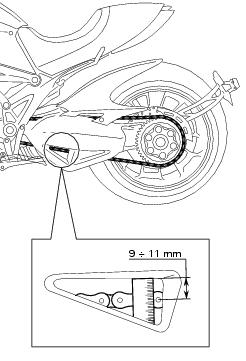
Make the rear wheel turn until you find the position where chain is tightest. Set the vehicle on the side stand. Push down the chain at the point of measurement and release. Measure the distance between the "aperture" upper profile and pin centre.
The read distance must be: 9 to 11 mm.
Important
If the drive chain is too tight or too slack, adjust it so that tension reading will fall within specified range.
To adjust the tension remove the rear splash guard (sect. 7 - 13, Removal of the swingarm).
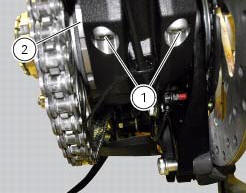
Slacken off the two clamp screws (1) that secure the rear wheel hub to the swingarm.
Fit the hook spanner code 88713.1038 Inserting its tooth in the eccentric hub (2).
Rotate the eccentric hub (2) to obtain the correct chain tension.
Turn counter clockwise to tighten the chain; clockwise to loosen (from chain side).
Important
An incorrectly tensioned chain will lead to accelerated wear of the transmission components.
If the screws (1) are removed, lubricate with specified grease underhead and thread, then tighten the screws (1) to the torque of 35 nm +/- 5% (sect. 3 - 3, Frame torque settings) proceeding with sequence 1-2-1.
Warning
The correct tightening of the fixing screws of the eccentric hub is essential for the safety of the rider and the passenger (sect. 3 - 3, Frame torque settings).
Refit the rear splash guard (sect. 7 - 13, Refitting the swingarm).
 Adjusting the steering head bearings
Excessive handlebar play or shaking forks in the steering head indicate that
the play in the steering head bearings
requires adjustment. Proceed as follows:
loosen the clamp screw (1) that holds t ...
 Checking brake pad wear and changing brake pads
Warning
Brake fluid is corrosive and will damage paintwork. Avoid contact
with eyes and skin. In the case of accidental contact,
wash the affected area thoroughly with plenty of running water.
Im ...
Other materials:
Side stand button
Introduction
The side stand button is located on the side stand. Together with the signal
from the clutch button and the neutral signal
generated by the gear sensor (transmitted to the engine control unit over the
can line), the side stand position signal is
used to enable or disable engine s ...
Checking the camshafts and supports
Check the cam contact surfaces for scratches, grooves, steps and waving.
Worn cams are frequently the cause of poor timing, which leads to loss of engine
power.
Place the camshaft between two centres and check the run-out on the areas
indicated using two dial gauges.
Service limit: 0.1 ...
Refuelling
Never overfill the tank when refuelling. The fuel level should
always be below the rim of the filler recess.
Warning
Use low-lead fuel with 95 octane rating at origin
minimum (see "top-ups" table, page 173).
Check that no fuel is trapped in the filler cap recess.
...