
Ducati Diavel Owners Manual: Clutch lever
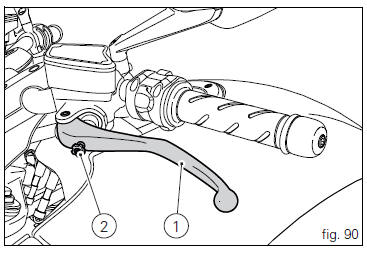
Lever (1) disengages the clutch. It features a dial adjuster (2) for lever distance from the twistgrip on handlebar.
The lever distance can be adjusted through 10 clicks of the dial (2). Turn clockwise to increase lever distance from the twistgrip. Turn the adjuster counter clockwise to decrease lever distance.
When the clutch lever (1) is operated, drive from the engine to the gearbox and the drive wheel is disengaged. Correct use of the clutch lever is very important in all riding situations, especially when moving off.
 Warning
Any adjustment of clutch lever must be carried out when motorcycle is stationary.
 Important
Using the clutch properly will avoid damage to transmission parts and spare the engine.
 Note
Note
It is possible to start the engine with the side stand down and the gearbox in neutral. When starting the bike with a gear engaged, pull the clutch lever (in this case the side stand must be up).
 Lh switch
Dip switch, light dip switch, two positions (fig. 89):
(A) every time pressed down light switches from low
beam on to low beam and high beam
on .
(B) pushed to the side = high
beam ...
 Rh switch
Red on/off switch.
Black engine start button.
The switch (1) has three positions:
Centre: run off. In this position, the engine cannot be
started and all electronic devices are off.
Pu ...
Other materials:
Warning indication (alarms/signals)
The dashboard activates in real-time some warnings / malfunction that are not
dangerous for the correct operation of the
vehicle.
At key-on (at the end of the check) one or more "warnings" are displayed if they
are active.
When a "warning" is triggered, the indication (amber yellow) remai ...
Removing of the side stand
Disconnect connector (a) of the stand switch (2) from the main wiring.
Loosen the screws (3), (10), (11) and (12) securing the stand bracket (4) to
the engine and remove the complete side
stand assembly.
Disassembly of the side stand
Undo the fixing screw (5) and remove the sid ...
Tips for use on the road
Activate the dtc, select level 8 and ride the motorcycle in
your usual style; if the level of dtc intervention seems
excessive, try reducing the setting to levels 7, 6, etc., Until
you find the level that suits you best.
If changes in the grip conditions and/or circuit characteristics
and/or ...