
Ducati Diavel Owners Manual: Lh switch
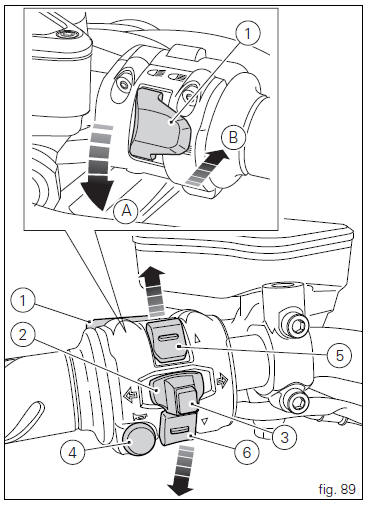
- Dip switch, light dip switch, two positions (fig. 89):
(A) every time pressed down light switches from low
beam on
 to low beam and high beam
on .
.
(B) pushed to the side
 = high
beam flasher (flash), "start-stop lap" function. - Button
 = three-position turn
indicator (fig. 89): Centre position = off;
Position  = left turn;
Position  = right turn.
- Turn indicator off, "riding style" activation and menu navigation button.
- Button
 = warning horn.
 - Navigation menu, display scroll and trip1 and trip2 reset button.
- Navigation menu, display scroll button.
 Entering pin code function for vehicle release
This function turns on the motorcycle "temporarily" in the
case of hf (hands free) system "malfunctions".
To activate the function, press the "emergency" hands free
...
 Clutch lever
Lever (1) disengages the clutch. It features a dial adjuster (2)
for lever distance from the twistgrip on handlebar.
The lever distance can be adjusted through 10 clicks of the
dial (2). Turn clo ...
Other materials:
Swingarm
Swingarm pivot
Washer
Special screw
Bush
Sealing ring
Roller bearing
Special screw
Rear swingarm
Spacer
Bearing
Spacer
Spacer
Hose clip
Pin
Chain slider (lower)
Washer
O-ring
Calliper mounting bracket
Circlip
Spacer
Inner ring
Hub
Cable grommet
Ch ...
Stored lap erase function
This function erases the stored laps.
To access the function it is necessary to view the "setting" menu", using
buttons (1) "s" or (2) "t" select the "lap"
function and press the reset button (3) to enter the following page.
Use button (1) "s" or (2) "t" to select "lap data" indication and ...
Replacing the rear phonic wheel sensor
Disconnect the rear abs sensor (5) connector (c) from the main electric
wiring.
Open all the retainer clamps of the rear abs sensor cable (5): refer to table of
sect. 7 - 6, Flexible wiring/hoses
positioning.
Remove the rear abs sensor (5) from its seat on the rear calliper mounting ...