
Ducati Diavel Service Manual: Dashboard diagnosis
This function identifies any abnormal vehicle behaviours.
The dashboard activates any abnormal vehicle behaviours in real time (errors).
At key-on (at the end of the check) one or more "errors" are displayed in red (only if they are active).
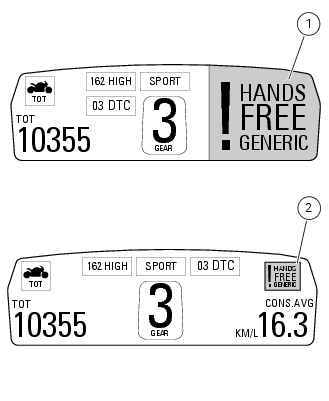
When an "error" is triggered, the indication (red) remains well visible (1) for 10 seconds then becomes smaller (2).
If there are multiple errors, they will scroll automatically every 3 seconds. The "engine/vehicle diagnosis - eobd" light on dashboard located on handlebar always turns on when one or more errors are activated.
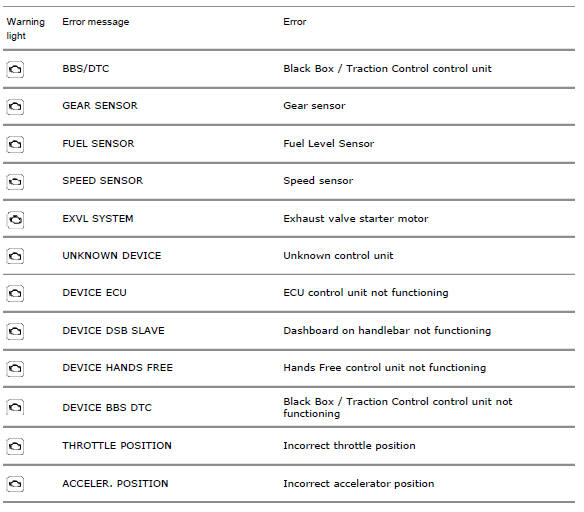
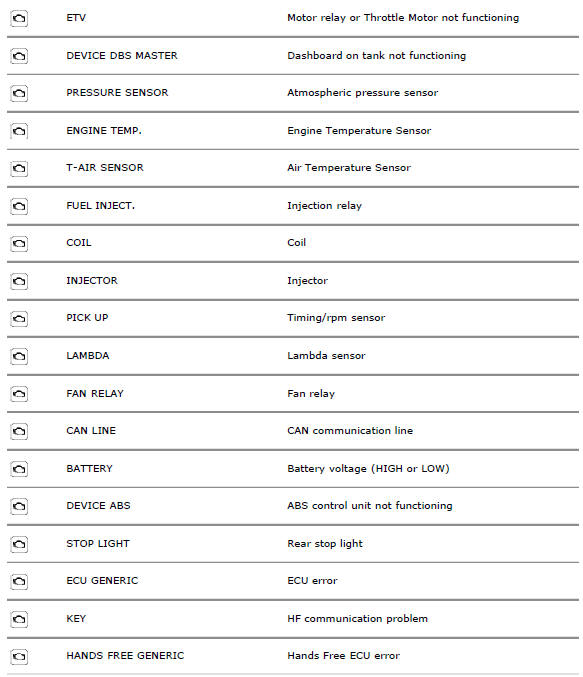
The table below shows the errors that can be displayed.
 Steering release error - steering still locked
The activation of this (amber yellow) "warning" indicates that the hands free
system was not able to extract the steering
lock.
Note
In this case, we recommend switching the vehicle off and on (k ...
 Setting menu
This menu is used to enable/disable and set some motorcycle functions.
To access the "setting menu" press and hold button (2) "t" for 3 seconds.
Note
When within this menu no other function can b ...
Other materials:
Refitting the cylinder/piston assembly
If new units are used, it is necessary to couple the cylinders and pistons of
the same selection (see paragraph "overhaul Of the cylinder
barrel/piston components" of this section).
If the pistons have been separated from their cylinders, before reassembling
these components, position the p ...
Removing the valve rocker arms
With the cylinder head in the condition described in the previous paragraph,
remove the rocker arms.
Unscrew the eight plugs (12) and recover the seals (15).
Using an m6 screw, withdraw the shafts (2) of the opening rocker arms (3) on
the exhaust and intake sides.
Remove the openi ...
Identification data
All ducati motorcycles have two identification numbers, for
frame (fig. 1) And engine (fig. 2).
Note
These numbers indicate the motorcycle model and
should be quoted when ordering spare parts.
...