
Ducati Diavel Service Manual: Reassembly of belly fairing
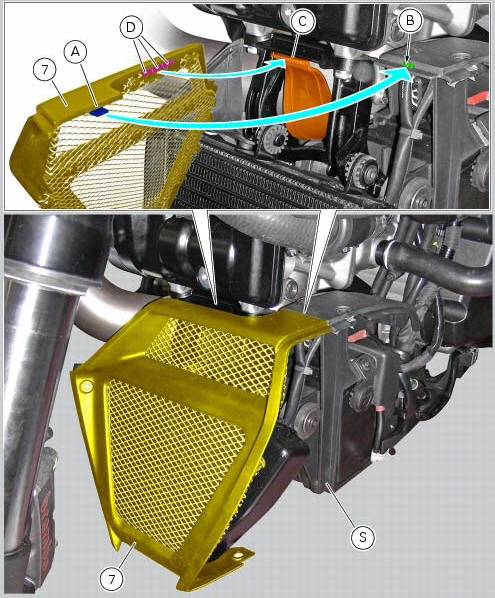
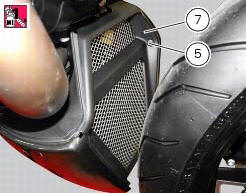
Position the oil cooler shield (7) inserting the tab (a) into the slit (b) in the electrical components support (s).
Note
On refitting, make sure that the tab (c) remains positioned under the retainers (d) of the shield (7).
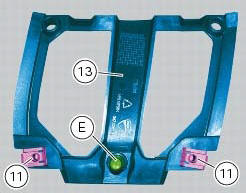
Fit clips (11) on bracket (13) and orient them as shown in the figure.
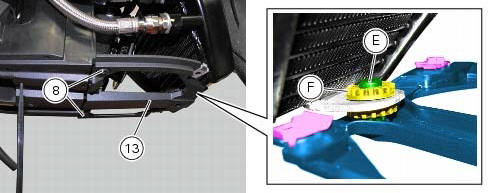
Apply rubber lubricant to the pin (e) of the bracket (13).
Insert pin (e) in the vibration damping pad (f) of the oil cooler.
Fit the bracket (13) on the electrical components support, and tighten the screws (8) to a torque of 4 nm +/- 10 % (sect. 3 - 3, Frame torque settings).
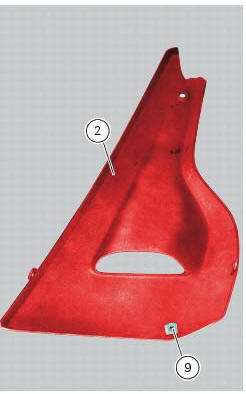
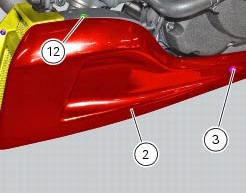
Fit clips (9) on lh belly fairing (2) and orient them as shown in the figure.
Put the lh belly fairing (2) in position by engaging slot (e) in the electrical components support, as shown in the figure.
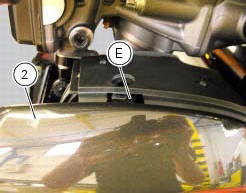
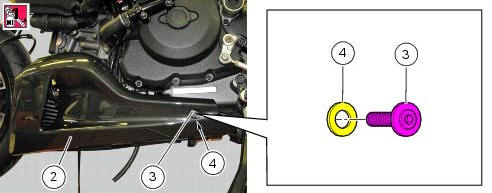
Apply recommended threadlocker on screws (3) and (12).
Fit the nylon washer (4) on the screw (3).
Fix the lh belly fairing (2) to the electrical components support by starting the screws (3) on the rear side, and the screw (12) on the upper side.
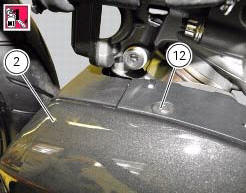
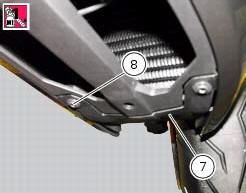
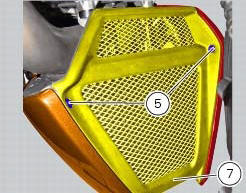
Apply recommended threadlocker to the screws (5) and (8).
Fix the lh belly fairing (2) to the oil cooler shield (7) by starting the screw (8) on the lower side, and the screw (5) on the front side.
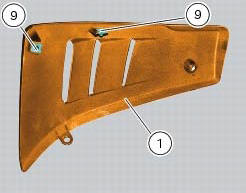
Fit the clips (9) on the rh belly fairing (1) orienting it as shown in the figure; follow the same procedure to refit the lh belly fairing (2).
Tighten to a torque of 4 nm +/- 10% (sect. 3 - 3, Frame torque settings) the screws (3), (5), (8) and (12) to fix the belly fairings (1) and (2) and the oil cooler shield (7).
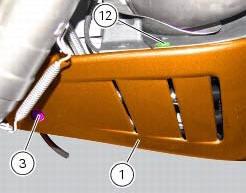
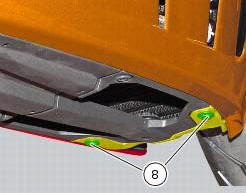
 Removal of belly fairing
Loosen and remove the screws (5) and (8) that secure the oil cooler (7) to
the rh (1) and lh (2) belly fairings.
Remove the lh belly fairing (2) by loosening the screws (3) with relevan ...
 Electrical components support
Clip
Screw
Voltage regulator
Battery fixing bracket
Battery support
Vibration damper mount
Hose clip
Vibration damper mount
Clip
Washer
Screw
Cover
Cable grommet
Batte ...
Other materials:
Helmet cable
Note
Helmet cable (2, fig. 104) Can be found inside the tool
kit, see "tool kit and accessories" on page 141.
Pass the cable through the helmet and insert the end of the
cable in the pin (3, fig. 104). Leave the helmet hanging and
refit the seat to hold it in place.
Warning
Th ...
Riding modes
The rider may select between four different riding modes (sport, touring,
urban and enduro) from the dashboard and via
the "turn indicator reset" button (3). Each riding mode contains settings for
the following:
The dtc set-up (sect. 6 - 7 "Dtc (ducati traction control) setting
function" ...
Throttle valve operation engine
Introduction
The electric motor actuating the throttle valve for the vertical cylinder is
mounted on the throttle body of the diavel, while
a link rod connects the vertical cylinder throttle valve to the horizontal
cylinder throttle valve. In the electric motor, the
throttle valve position se ...