
Ducati Diavel Service Manual: Refitting the front mudguard
Warning
Do not use the motorcycle without the front mudguard fitted to avoid the risk of the brake pipes fouling the wheel on braking.
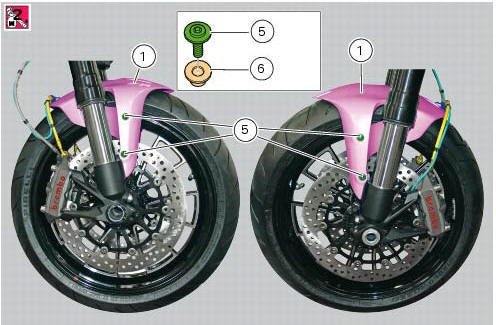
Insert the screws (5) in spacers (6) with recommended threadlocker, as shown in the figure.
Position the front mudguard (1) and start the special screws (5).
Tighten the screws (5) to a torque of 5 nm +/-10% (sect. 3 - 3, Frame torque settings).
Warning
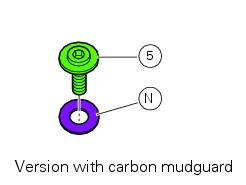
The version provided with carbon mudguards must feature nylon washers (n) instead of the spacers (6).
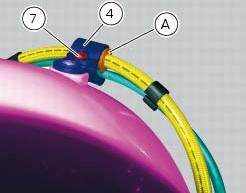
Place the hose grommet (a) of the front brake hose and the speed sensor cable inside clip (4) as shown in the figure.
Close the clip (4) and tighten the screw (7) to a torque of 0.35 Nm +/- 10% (sect. 3 - 3, Frame torque settings).
 Removal of the front mudguard
Undo the screw (7) and remove the front brake lines (a) from the hose grommet
(4).
Undo and remove the special retaining screws (5): keep the spacers (6).
Remove the front mudguard (1).
War ...
 Removing the rear mudguard
Undo the screws (9) and remove the rear mudguard (8) from the swingarm.
...
Other materials:
Stored lap display function
This function displays the stored laps.
To access the function it is necessary to view the ""setting" menu", using
buttons (1) "s" or (2) "t" select the "lap"
function and press the reset button (3) to enter the following page.
Use button (1) "s" or (2) "t" to select "lap data" indication a ...
Indicator cons. Avg - average fuel consumption
This function indicates the "average" fuel consumption.
The calculation is made considering the quantity of fuel used and the km
travelled since the last trip 1 reset. When trip 1
is reset, the value is set to zero and the first available value is shown on the
display 10 seconds after the re ...
Stored lap erase function
This function erases the stored laps.
To access the function it is necessary to view the "setting" menu page 48, using
button (1, fig. 14) ?"" or (2, fig.
14) ?"" select the "lap" function and
press the reset button
(12, fig. 12) To go to next page.
...