
Ducati Diavel Owners Manual: Front brake lever
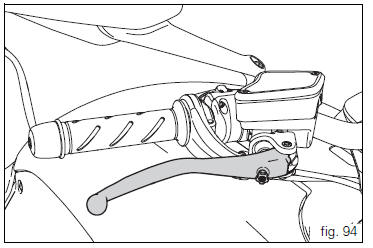
Pull the lever (1, fig. 94) Towards the twistgrip to operate the front brake. The system is hydraulically assisted and you only need to pull the lever gently.
The control lever (1, fig. 94) Features a dial adjuster (2, fig. 94) For lever distance from the twistgrip on handlebar adjustment.
The lever distance can be adjusted through 10 clicks of the dial (2, fig. 94). Turn clockwise to increase lever distance from the twistgrip. Turn the adjuster counter clockwise to decrease lever distance.
 Throttle twistgrip
The twistgrip (1, fig. 93) On the right handlebar opens the
throttles. When released, it will spring back to the initial
position (idling speed).
...
 Rear brake pedal
Push down the pedal (1, fig. 95) To operate the rear brake.
The system is hydraulically controlled.
...
Other materials:
Storing the bike away
If the motorcycle is to be left unridden over long periods, it is
advisable to carry out the following operations before storing
it away:
clean the motorcycle;
empty the fuel tank;
pour a few drops of engine oil into the cylinders through the
spark plug bores, then turn the engine over by hand ...
Checking and overhauling the components
Clearance between the clutch drum and friction plates
Insert a friction plate (e) in the clutch drum (f) and measure the clearance
(s) with a feeler gauge.
Clearance "s" must not exceed 0.6 Mm.
If it does, renew the plates and, if necessary, the clutch drum.
Overhaul of the clutch plat ...
Horn not working
Fault codes
Dds: horn diagnosis -> short circuit to ground (s.C. Gnd).
Dashboard: the error "claxon" (horn) is shown on the service display. The eobd
warning light activates.
Wiring diagram
Db dashboard connection, s horn button. 5 Blue/white - b/w, 1 red/blue - r/b,
db 19 purple/bl ...