
Ducati Diavel Service Manual: Removal of the fuel tank fairings

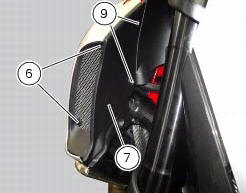
Remove the rh air inlet (7) by loosening screws (6) and (9).
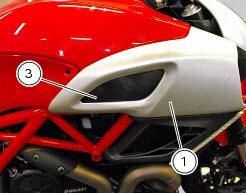
Undo the retaining screw (3) of the rh front half-fairing (1).
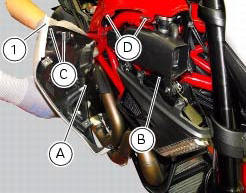
Slightly pull the pin (a) to disengage it from the seal (b), and remove the rh front half-fairing (1) by sliding it onwards and releasing the tabs (c) from the seals (d).
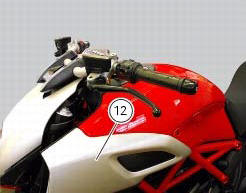
Follow the same procedure to remove the lh half-fairing (12).
Loosen the screws (16) and (25) securing the tank plug cover (23) but do not remove it.
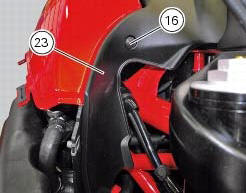
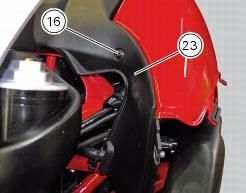
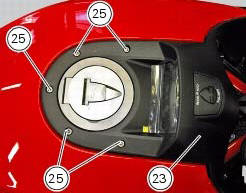
Lift the tank plug cover (23) up in order to reach the wiring (e) of the dashboard (f).
Disconnect the wiring (e) from the dashboard (f).
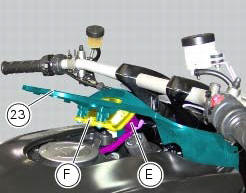
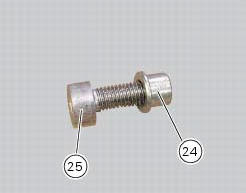
Remove the tank plug cover (23) from the vehicle recovering the screws (25) and spacers (24).
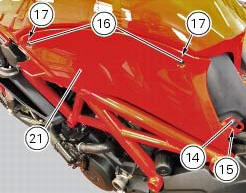
Remove the lh tank fairing (21) by loosening screws (16) and (14); recover the washers (17) and (15).
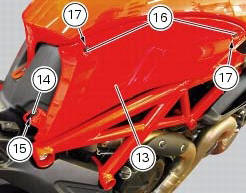
Remove the rh tank fairing (13) by loosening screws (16) and (14); recover the washers (17) and (15).
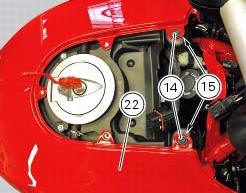
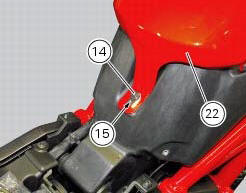
Remove the tank fairing (22) by loosening the screws (14); recover the nylon washers (15).
 Fairings
Rh front half-fairing
Clip
Screw
Right-hand support
Screw
Screw
Rh air inlet
Lh air inlet
Screw
Clip
Left-hand support
Lh front half-fairing
Lh tank fairing
Screw
Ny ...
 Disassembly of the front half-fairings
Undo the screws (5) and separate the rh support (4) from the front right
half-fairing (1).
Follow the same procedure to disassemble the lh half-fairing (12). ...
Other materials:
Removal of the rear brake calliper
Important
The brake manufacturer advises against any servicing of the internal
components of brake callipers or the master cylinder.
Incorrect overhaul of these critical safety components can endanger rider and
passenger safety.
Before removing the parts in question, you must first carry ou ...
Injection and ignition
Introduction
Ignition is via a single stick coil per cylinder installed in the spark plug
well. Each thermal unit is supplied by a single
injector, placed under the throttle valve. The amount of fuel injected and the
ignition advances are determined by the
control unit specifically for each c ...
Indication of range reached for service
When service coupon threshold is achieved, upon every key-on the system
displays the indication of the type of
intervention that is required (oil service or desmo service).
The (red) warning is activated as a large icon for 10 seconds upon every key-on
(1) then as a small warning that
remai ...