
Ducati Diavel Service Manual: Warning indication (alarms/signals)
The dashboard activates in real-time some warnings / malfunction that are not dangerous for the correct operation of the vehicle.
At key-on (at the end of the check) one or more "warnings" are displayed if they are active.
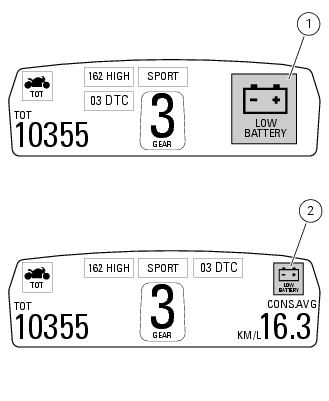
When a "warning" is triggered, the indication (amber yellow) remains well visible (1) for 10 seconds then becomes smaller (2).
If there are multiple indicators, they will scroll automatically every 3 seconds.
Note
No signal lights turn on if one or more "warnings" are activated.
The following "warnings" could be displayed: "low" battery level (low battery); traction control "deactivated" (dtc off); hands free key (hf) "not recognised"; "low" hands free key (hf) battery level; "high" engine coolant temperature (high temp); steering release error - steering still locked (unlock error).
With one or more "warnings" active, the user may access other functions by pushing button (2) "t".
 Indication of range reached for service
When service coupon threshold is achieved, upon every key-on the system
displays the indication of the type of
intervention that is required (oil service or desmo service).
The (red) warning is ...
 Low battery level
The activation of this (amber yellow) "warning" indicates that the status of
the battery vehicle is low.
It is activated when the battery voltage is ¼ 11.0 Volt.
Note
In this case, ducati ...
Other materials:
Checking the battery charging system
To check the current flow of the recharging circuit, use the "dds" diagnosis
instrument, which is equipped with an
inductive clamp-type amperemeter: refer to chapter "testing the battery charging
system", sect. 6 - 11
With the dds diagnosis instrument you can determine the engine rpm required ...
Units of measurement modification function
This function allows you to change the units of measurement of the displayed
values.
To access the function it is necessary to view the ""setting" menu", using
buttons (1) "s" or (2) "t" to select the "set
units" function and press the reset button (3) to enter the following page.
Use but ...
Key-on/key-off using the red key on the handlebar with the active key
A key-on can be performed by pressing the red key (6) on
the handlebar in the hands free on/off position and in
the presence of the active key (3, fig. 77).
Note
The active key (3, fig. 77) Has a range of approx. 1.5 M,
therefore it must be located within this range.
Key-off can be performed ...