
Ducati Diavel Owners Manual: Lh switch
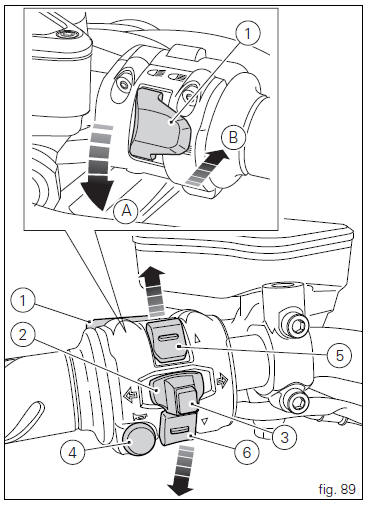
- Dip switch, light dip switch, two positions (fig. 89):
(A) every time pressed down light switches from low
beam on
 to low beam and high beam
on .
.
(B) pushed to the side
 = high
beam flasher (flash), "start-stop lap" function. - Button
 = three-position turn
indicator (fig. 89): Centre position = off;
Position  = left turn;
Position  = right turn.
- Turn indicator off, "riding style" activation and menu navigation button.
- Button
 = warning horn.
 - Navigation menu, display scroll and trip1 and trip2 reset button.
- Navigation menu, display scroll button.
 Entering pin code function for vehicle release
This function turns on the motorcycle "temporarily" in the
case of hf (hands free) system "malfunctions".
To activate the function, press the "emergency" hands free
...
 Clutch lever
Lever (1) disengages the clutch. It features a dial adjuster (2)
for lever distance from the twistgrip on handlebar.
The lever distance can be adjusted through 10 clicks of the
dial (2). Turn clo ...
Other materials:
Overhauling the rear wheel
Inspect the condition of the rear wheel.
As the wheel rim has no bearings, it should be supported using the service tool
code 88713.2951.
Note
This service tool can also be used to install the wheel on a balancing
machine.
Overhauling the wheel
Inspect the wheel as described below.
...
Clutch cover
Clutch-side crankcase cover
Screw
Screw
Oil level sight glass
Screw
Plate
Bush
Sealing ring
Shim washer
Circlip
O-ring
Locating bush
O-ring
Plug
Sealing washer
Screw
Plug
Panel
Spare parts catalogue
Diavel abs clutch-side crankcase cover
Diavel carbon
a ...
Units of measurement modification function
This function allows you to change the units of measurement of the displayed
values.
To access the function it is necessary to view the ""setting" menu", using
buttons (1) "s" or (2) "t" to select the "set
units" function and press the reset button (3) to enter the following page.
Use but ...