
Ducati Diavel Service Manual: Refitting the tail light
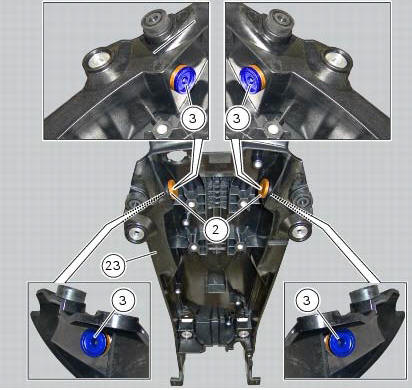
Fit the spacers with collar (3) into the rear vibration dampers (2) located on the gloves compartment (23).
Note
Two spacers (3) must be inserted inside and outside on the right side and two spacers (3) must be inserted inside and outside on the left side.
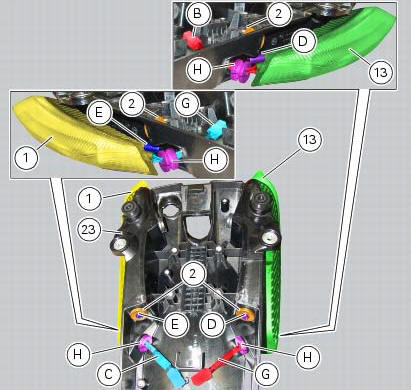
Insert the split vibration damper (h) on the wiring (g) of the left optical unit (13) and the split vibration damper (h) on the wiring (c) of the right optical unit (1).
Note
The usa version uses red optical units (13) and (1).
Fit the left optical unit (13) and the right optical unit (1) on the compartment (23), inserting their pins (d) and (e) into the vibration dampers (2).
Fit the split vibration dampers (h) into the corresponding holes of the compartment (23).
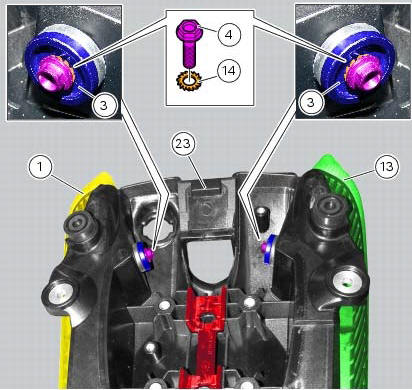
Fit the washers (14) on the screws (4).
Fix the optical units (13) and (1) to the compartment (23) starting the screws (14).
Note
The screws (14) must be inserted into the internal spacers (3) fitted previously.
Tighten the screws (4) to a torque of 6 nm +/- 10% (sect. 3 - 3, Frame torque settings).
 Removal of the tail light
Disconnect the connectors (a) and (b) of the tail lights (1) and (13).
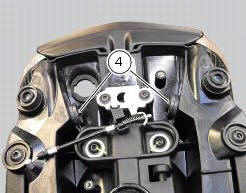
Loosen the screws (4) and slide the tail lights (1) and (13) to the rear side;
recover the four spacers (3) and the wash ...

Other materials:
Passenger grabhandle
Passenger grabhandle (1, fig. 107) Is located inside the tail
guard; to take it out, remove the seat (see "removal of the
seat" on page 119), pull the knob (2, fig. 107) While taking out
the grabhandle (1, fig. 107) From its housing until it is fully
extended.
Warning
Before use, pu ...
Immobilizer override procedure
This procedure makes it possible to "temporarily" turn on
the motorcycle if the hf (hands free) system is not working.
Note
The pin code function must be activated by entering
your 4 digit pin in the instrument panel, otherwise the
vehicle cannot be turned on temporarily in the case ...
Removing of the abs control unit
Drain the hydraulic fluid that is inside the front and rear braking system
tubes by disconnecting them from the master
cylinder and the calliper (sect. 4 -3, Changing the brake fluid).
Disconnect the connector (a) of the abs control unit (6).
Loosen the screws (16) that retain the abs ...