
Ducati Diavel Service Manual: Tail light - number plate holder
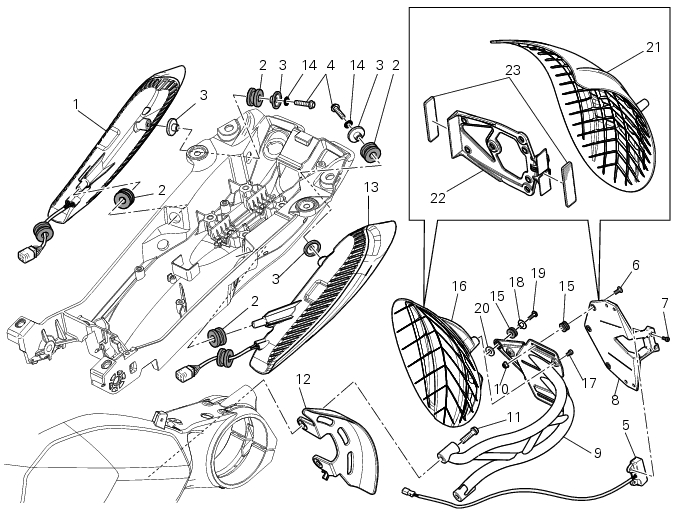
- Rh tail light
- Vibration damper mount
- Spacer
- Screw
- Number plate light
- Screw
- Screw
- Plate
- Number plate holder
- Nut
- Screw
- Rear chain guard
- Lh tail light
- Spring washer
- Vibration damper mount
- Splashguard
- Screw
- Spacer
- Screw
- Washer
- Splashguard (europe - australia)
- Plate (europe - australia)
- Reflector (europe - australia)
Spare parts catalogue
Diavel abs number plate holder - tail light
Diavel carbon abs number plate holder - tail light
Important
Bold reference numbers in this section identify parts not shown in the figures alongside the text, but which can be found in the exploded view diagram.
- Removal of the licence plate holder
- Refitting the number plate holder
- Removal of the tail light
- Refitting the tail light
 Reassembly of the tool tray
Place the tool tray unit (23) on the lateral brackets (2) and (3) by
tightening the screws (24) to 14 nm +/- 5% (sect. 3-3,
Frame torque settings).
If the handle guide (32) has been previously r ...
 Removal of the licence plate holder
Disconnect connector (5) of the number plate holder wiring from the main one.
Release the number plate holder light cable from the ties and the cable grommets
as indicated in sect- 7 - 6, fle ...
Other materials:
Clutch cover
Clutch-side crankcase cover
Screw
Screw
Oil level sight glass
Screw
Plate
Bush
Sealing ring
Shim washer
Circlip
O-ring
Locating bush
O-ring
Plug
Sealing washer
Screw
Plug
Panel
Spare parts catalogue
Diavel abs clutch-side crankcase cover
Diavel carbon
a ...
Display background colour (automatic adjustment)
Instrument panel background colour is set automatically
according to exterior lighting conditions.
When sensor detects "poor lighting" (night), it switches to
black background mode; vice versa when a "significant"
lighting is detected (day), it switches to white background
...
Engaged gear indicator
This function displays the gears (1, fig. 25).
The instrument panel receives information and indicates the
engaged gear or "n" for neutral.
Note
In the case of a gear sensor "error", a dash "-" (not
flashing) will be displayed.
...