
Ducati Diavel Service Manual: Alternator
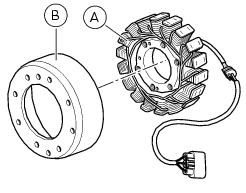
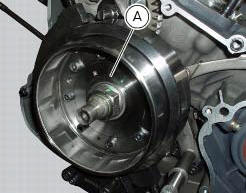
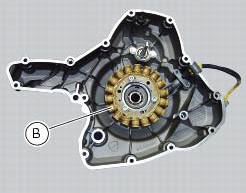
It is equipped with a 12 v, 430 w generator, consisting of a fixed element (stator, a) located on the generator cover and of a movable element (rotor, b) fixed to the crankshaft.
Note
To check the battery charging system for faults, use the dds diagnosis instrument and follow the instructions given in the paragraph, "testing the battery charging system" (sect. 6 - 11).
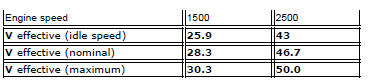
The absolute value of voltage measured across the terminals of two of the three yellow cables (the measured value will be the same whichever combination of cable is used) must be within the range indicated in the table below.
(Ambient temperature: 35 C - 70 C)
Important
Before testing, disconnect the alternator wiring from the electrical system when the ignition key is set to off.
Values significantly lower than those indicated above can be due to:
- Partially demagnetised rotor;
- Short-circuited windings.
In the above cases the whole alternator assembly (rotor and stator) should be renewed.
If checks have a favourable outcome, reconnect the alternator to the regulator with ignition key on off. Make sure that no cables are damaged or disconnected.
Removal of the alternator
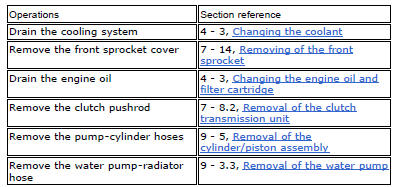
Disconnect the cables of the alternator-side electric system (sect. 6 -1, Routing of wiring on frame).
Remove the generator cover, the stator (a) and the rotor (b) (sect. 9 - 8, Removal of the generator cover).
Refitting the
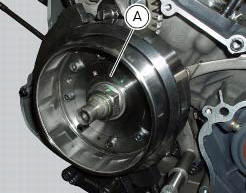
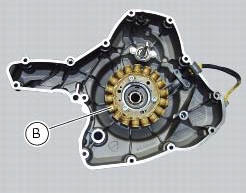
Refitting the generator
Fit the rotor (b), the stator (a) and the alternator-side crankcase cover.
Connect the cables of the generator side electric system (refer to the table in chapter "routing of wiring on frame", sect. 6 - 1).
 Battery
Battery safety rules
Warning
Before carrying out any operations on the battery, keep in mind the
safety standards (sect. 1 - 3, General safety rules).
When under charge, batteries produce explo ...
 Rectifier-regulator
The rectifier (1) is placed in the electrical components compartment.
The rectifier/regulator consists of an aluminium casing containing the diodes
that rectify the current produced by the
alter ...
Other materials:
Fairings
Rh front half-fairing
Clip
Screw
Right-hand support
Screw
Screw
Rh air inlet
Lh air inlet
Screw
Clip
Left-hand support
Lh front half-fairing
Lh tank fairing
Screw
Nylon washer
Special screw
Washer
Spacer
Spring
Rubber pad
Rh tank fairing
Tank fairing
...
How to switch the dashboard on
The dashboard may switched on either from the on/off switch on the handlebar
or from the button on the hands free
system.
With the engine off, the on/off switch is turned to "run off".
With the motorcycle and dashboard off, the on/off switch is turned to "run
off".
To switch the dash ...
Beam setting
When checking beam setting, put the motorcycle upright.
Tyres should be inflated at the correct pressure and one
person should be sitting astride the motorcycle, keeping it at
right angles to its longitudinal axis. Place the motorcycle
opposite a wall or a screen, 10 meters apart from it, draw ...