
Ducati Diavel Service Manual: Coolant temperature
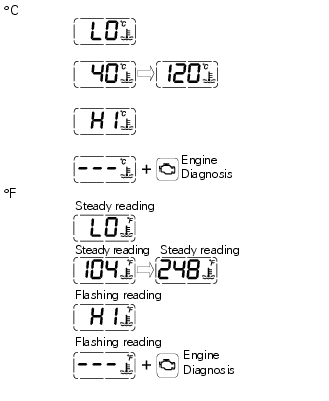
This function indicates coolant indication state.
The temperature unit of measure can be selected (C or f).
The reading is indicated as follows: if the reading is between - 39C and +39C "lo" is shown flashing on the dashboard (steady); if the reading is between +40C and +120C it appears on the dashboard (steady); if reading is +121 C or higher, "hi" is shown flashing on the information panel.
Note
In the event of a sensor "error", flashing dashes ("- - -") are shown and the "engine/vehicle diagnosis - eobd" indicator turns on.
Display background colour (automatic adjustment)
Dashboard background colour is set automatically according to exterior lighting conditions.
When sensor detects "poor lighting" (night), it switches to black background mode; vice versa when a "significant" lighting is detected (day), it switches to white background mode. It is nevertheless possible to customise this function through the "setting" menu function "back light - dashboard 1", on page 62, and possibly set one of the two modes available, night or day, as permanent setting (or go back to auto mode).
 Clock
Clock
This function shows the time.
Time is always displayed as follows:
am from 0:00 to 11:59
Pm from 12:00 to 11:59
If battery power is suddenly cut off (batt-off), when battery power is
restored ...
 Dashboard on tank
Menu 1 (tot, trip1, trip2, trip fuel).
Menu 2 (cons.Avg., Cons., Speed avg, air and trip time) if active.
Gear / neutral indication.
Icon referred to the function below from menu 1.
Indicat ...
Other materials:
Clock setting function
This function sets the clock.
To access the function it is necessary to view the "setting" menu page 48, using
button (1, fig. 14) ?"
"or (2, fig. 14) ?""select the "clock"function and
press the reset button
(12, fig. 12) To confirm.
In the follow ...
Throttle valve actuator motor relay
Introduction
The throttle valve actuator motor is powered by the engine control unit. The
engine control unit receives the necessary
power from a specific relay.
Component assembling position
A injection relay; b etv relay (throttle valve actuator motor), c radiator
fan relay, d engine c ...
Removal of the control unit
Loosen the screws (1) and remove the relay supporting bracket (2), disconnect
the connectors (3) and remove the control
unit (4) from the vehicle.
...