
Ducati Diavel Service Manual: Hands free
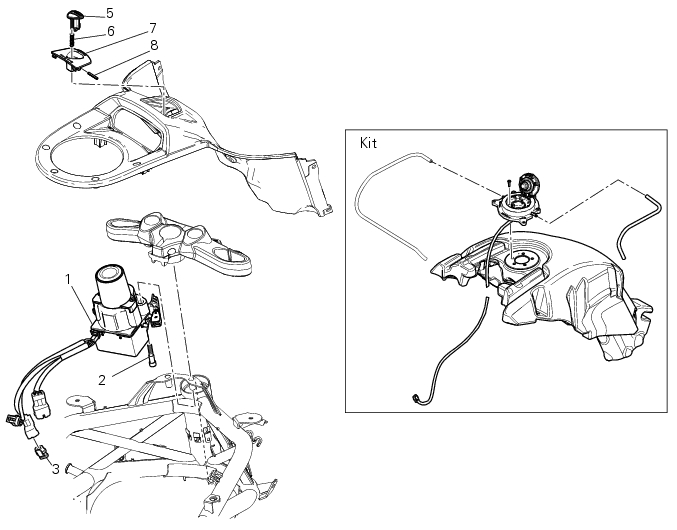
- Hands free
- Special screw
- Plug
- Electric fuel plug
- Button
- Spring
- Frame
- Elastic pin
Spare parts catalogue
Diavel abs handlebar and controls
Diavel carbon abs handlebar and controls
Important
Bold reference numbers in this section identify parts not shown in the figures alongside the text, but which can be found in the exploded view diagram.
 Refitting the clutch transmission unit
Position pipe (4) on the clutch slave cylinder (r).
Position the two seals (19) and tighten the screw (18) to a torque of 23 nm +/-
10% (sect. 3 - 3, Frame torque settings).
Refit the bleed valv ...
 Removing the hands free
Loosen the screws (2) and remove the hands free system (1) from the frame.
...
Other materials:
How to reset the pin code
The pin code can be reset with the dds, i.E. It can be brought to the same
condition it was in when the bike came out
the factory. It is possible to complete the procedure with the relevant pin code
reset function.
Once the pin code has been reset it will be necessary to store a new one. In ...
Horn not working
Fault codes
Dds: horn diagnosis -> short circuit to ground (s.C. Gnd).
Dashboard: the error "claxon" (horn) is shown on the service display. The eobd
warning light activates.
Wiring diagram
Db dashboard connection, s horn button. 5 Blue/white - b/w, 1 red/blue - r/b,
db 19 purple/bl ...
Introduction to the "hands free" system
The hands free system allows the rider to start the engine without physically
using the ignition key. The ignition key
merely has to be in the vicinity of the motorcycle, such as in the rider's
pocket, for example, in order to use the vehicle.
Compared to the standard ignition switches the h ...