
Ducati Diavel Owners Manual: Lcd unit functions
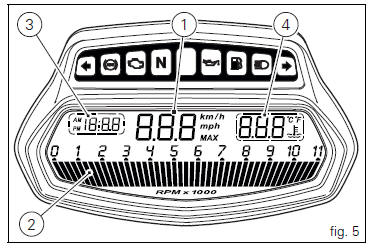
- Speedometer.
Gives road speed.
- Rev counter.
Indicates engine revs per minute.
- Clock.
- Water temperature indicator.
Indicates engine coolant temperature.
 Important
Stop riding if the temperature reaches the maximum value, otherwise the engine might be damaged.
 Instrument panel on handlebar
Lcd.
Neutral light n (green). Illuminates when the gearbox is in neutral.
High beam light (blue).
It turns on to indicate that the high beam lights are on.
Engine oil pressure light ...
 Vehicle speed indicator
this function displays vehicle speed (km/h or mph
depending on the set measurement system).
the instrument panel receives information about the actual
speed and displays the number increased by 5 ...
Other materials:
Timing system
Central external cover
Air filter
Horizontal cylinder timing belt cover
Screw
Filter support
Screw
Washer
Nut
Tensioner pulley assembly
Circlip
Camshaft pulley
Tensioner pin
Idler pulley assembly
Timing belt
Nut
Key
Spacer
Camshaft pulley
Driveshaft pulley ...
Recovery in the event of flat active key battery
If the active key battery is running low or is flat, the hands free system
shows the relative icon on the dashboard.
The following image shows the icon appearing on the circular area of the
dashboard: this indicates that the active key
battery is flat.
For the replacement procedure of t ...
Fuel, lubricants and other fluids
Important
Do not use additives in fuel or lubricants.
Engine oil
A good quality engine oil has special properties. Use only a highly detergent
engine oil with certified se, sf or sg or
higher service ratings as marked on the container.
Viscosity
Sae 15w-50
The other viscosity grades ...