
Ducati Diavel Owners Manual: Maintenance indicator
This function indicates that the vehicle is about to or has travelled a distance for which an authorised ducati service centre should be contacted to have the general maintenance or oil change performed.
Maintenance table
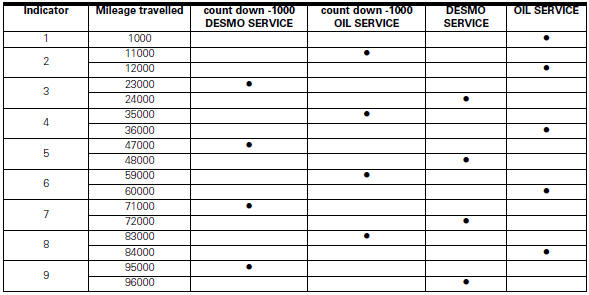
First warning - oil service 1000 km
The first warning is activated at 1000 km (600 miles) of odometer reading.
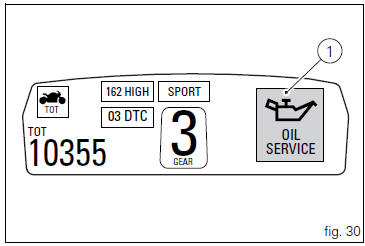
The (red) warning is activated as a large icon for 10 seconds upon every key-on (1, fig. 30) Then as a small warning that remains displayed (2, fig. 31) Until it is reset.
 Warning
This message can only be reset by the ducati dealer or authorised service centre that performs the maintenance.

 Riding style function (riding style change)
This function changes the motorcycle riding style.
Each riding style is associated with a different intervention
level of the traction control (dtc - ducati traction control)
and different engine ...
 Residual range indication when the service is due
After resetting the first oil service warning (triggered at
1000 km), upon every key-on the system displays the
indication of which type of service should be performed next
(oil service or desmo se ...
Other materials:
Steering lock on indication
This function informs that the steering lock was turned on.
The steering lock can be turned on during the first 60
seconds after turning off the vehicle by pressing down on the
"run" button.
If the steering lock was enabled correctly, the instrument
panel will show the indication ...
Start procedure with pin code (no keys)
The motorcycle may be started without keys with a special procedure using the
dashboard and the switches on the
handlebar.
Note
This procedure is only possible if the pin code has been enabled
previously. For security reasons, the pin code is disabled
by default when the vehicle leaves the f ...
Refitting the evaporative emissions canister
To refit, carry out the removal operations in reverse order, making sure to
locate the hoses as shown in the figures at the
end of the chapter.
Positioning the hoses / clamps and canister filter
...