
Ducati Diavel Service Manual: Reassembling the frame and the lateral footrests
Apply the recommended grease to the thread of the pins (9) and of the nuts (8).
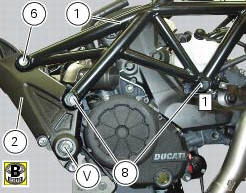
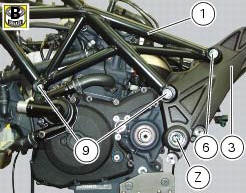
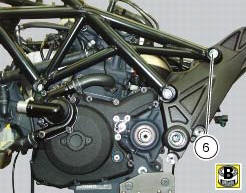
Place the frame (1) and the brackets (2) and (3) on the engine block. Start the pins (9) by holding the nuts (8) and insert without tightening the screws (6) into the adjusters (4).
Position and fix the rear shock absorber support to the engine crankcases and the swingarm brackets (sect. 7 - 12, Refitting the shock absorber support).
Tighten the screw (v) on the swingarm shaft right side to a torque of 72 nm +/- 5% (sect. 3 - 3, Frame torque settings), by holding the screw (z) on the left side.
Tighten the indicated front nut (8) to a torque of 60 nm +/- 5% (sect. 3 - 3, Frame torque settings), by holding the pin (9) on the left side.
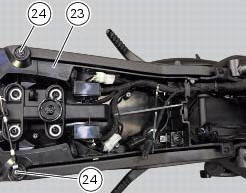
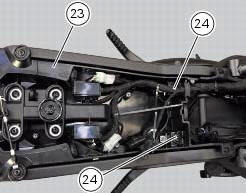
Reassemble the tool tray (23), as described in the following paragraph, by tightening the rear screws (24) to 14 nm +/- 5% (sect. 3 - 3, Frame torque settings).
Tighten the indicated rear nut (8) to a torque of 60 nm +/- 5% (sect. 3 - 3, Frame torque settings), by holding the pin (9) on the left side.
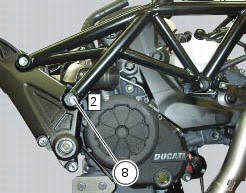
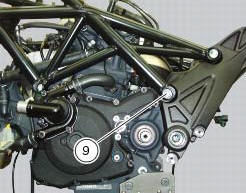
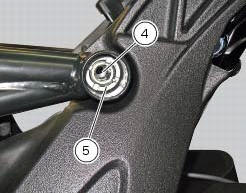
Work first on the left side and then on the right one, remove the special screws (6) and tighten to a torque of 0.5 Nm +/- 10% (sect. 3 - 3, Frame torque settings) the adjusters (4) and make sure they are fully home on the rear plates of the rear subframe.
Locate service tool no. 88713.3166 On the ring nut (5) and fit the torque wrench to the tool.
Hold the clearance adjusters (4) and tighten the ring nuts (5) to a torque of 100 nm +/-5% (sect. 3 - 3, Frame torque settings).
Lubricate thread and underside of special screws (6), then start them on the frame, and tighten them to a torque of 55 nm +/-5% (sect. 3 - 3, Frame torque settings).
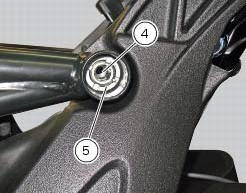
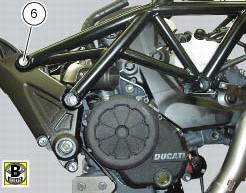
Tighten the front screws (24) to a torque of 14 nm +/- 5% (sect. 3 - 3, Frame torque settings) that retain the tool tray (23).
 Reassembly of structural components and the frame
Check for the nuts with clips (8).
Apply recommended grease on the threads of the adjusters (4) and the ring
nuts (5) having care not to have grease on
the surface (c) of the adjusters.
Tig ...
 Reassembly of the tool tray
Place the tool tray unit (23) on the lateral brackets (2) and (3) by
tightening the screws (24) to 14 nm +/- 5% (sect. 3-3,
Frame torque settings).
If the handle guide (32) has been previously r ...
Other materials:
Refitting the fuel tank
If the fuel tank has been disassembled into its component parts, reposition
all the parts as shown in the exploded view.
In particular:
tighten the screws (13) to a torque of 5 nm +/-10% (sect. 3 - 3, Frame torque
settings).
Refit the tank by inserting its rear side into the pin on the ...
Removal of the tool tray
To remove the tool tray unit from the lateral footrests, loosen the screws
(40) and remove the splashguard (20).
Undo the screws (15) and remove the cover (16).
Move the wiring branch from the seat (s) on the tool tray.
Loosen the screws (24) to remove the tool tray unit (23) from ...
Adjusting the clutch lever and front brake lever
The clutch lever (1) is fitted with a span adjuster (2) which serves to alter
the distance of the lever from the handlebar.
The lever distance can be adjusted through 10 clicks of the dial (2). Turn
clockwise to increase lever distance. Turn the
adjuster counter clockwise to decrease lever d ...