
Ducati Diavel Service Manual: Replacing the tank flange and fuel sensor
Loosen the screws (19) securing the fuel tank flange (20).
Remove the flange (20) from the tank (20).
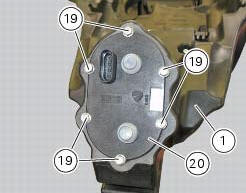
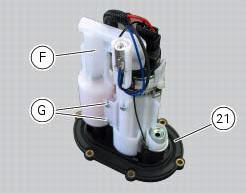
Recover the seal (21).
Undo and remove the two fixing screws (g) and move the protection (f).
Before reassembly, carefully remove any deposits or scale from all parts.
Note
The flange is supplied as a spare part complete with the fuel pump and pressure regulator: the entire flange assembly must be replaced in the event of malfunction.
 Refitting the filler cap
Position seal (18) in tank cap (10) as shown and reassemble following the
removal procedure in the reverse sequence.
In particular tighten the screws (17) to a torque of 3 nm +/- 10% (sect. 3 - ...
 Refitting the fuel tank flange
Insert the flange (20) in its housing in the fuel tank.
Apply prescribed threadlocker to the screws (9) and tighten to a torque of 6 nm
+/- 10% (sect. 3 - 3, Frame torque
settings), following th ...
Other materials:
Evaporative emissions canister
Sealing washer
Union
Hose clip
Hose
Clamp
"T" fitting
Hose
Support
Special screw
Rubber mounting
Hose
Hose clip
Evaporative emissions canister
Hose
Spring
Spare parts catalogue
Diavel abs evaporative emissions canister
Diavel carbon
abs
evaporative emissions ...
Rh switch
Red on/off switch.
Black engine start button.
The switch (1) has three positions:
Centre: run off. In this position, the engine cannot be
started and all electronic devices are off.
Pushed down: on/off. In this position, the system can
be turned on (key-on) and off (key-off).
Pus ...
Vehicle speed indicator
This function displays vehicle speed (km/h or mph depending on the set
measurement system).
The dashboard receives information about the actual speed and displays the
number increased by 5%.
Maximum speed displayed is 299 km/h (186 mph).
Over 299 km/h (186 mph) the display will show a s ...