
Ducati Diavel Service Manual: Stored lap display function
This function displays the stored laps.
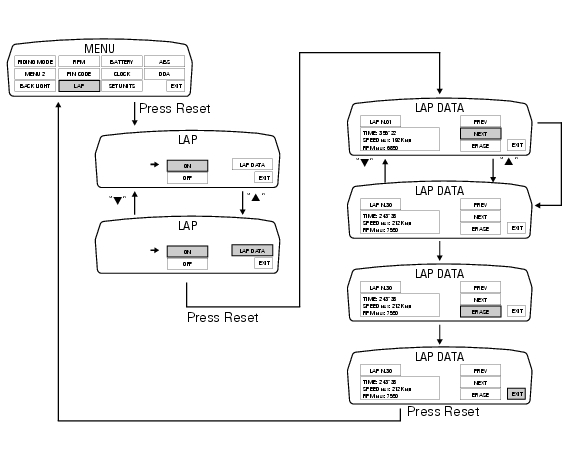
To access the function it is necessary to view the ""setting" menu", using buttons (1) "s" or (2) "t" select the "lap" function and press the reset button (3) to enter the following page.
Use button (1) "s" or (2) "t" to select "lap data" indication and press the reset button again (3) to enter the page showing the previously recorded lap times.
The dashboard displays the information as follows: at top left, the number of the displayed lap (ex.: Lap n.01); At bottom left, a rectangle inside which is the lap time (time), top speed in that lap (speed max) and top rpm in the same lap (rpm max); on the right, use button (1) "s" or (2) "t" to select "next" (so that every time the reset button is pressed (3) the next lap is displayed) or "prev" (so that every time the reset button is pressed (3) the previous lap is displayed); to exit, select "exit" and press the reset button (3).
Note
The max stored speed is indicated on the display (increased by 5%).
If no lap times are saved in memory, "no lap" indication is displayed and lap timer will indicate "-.- -.- -", Max rpm will be = - - - - - - and max speed = - - - - -.
Note
If the stored times are deleted while the lap function is active, it will be automatically deactivated.
 Lap registration function
This function describes the "lap" time registration.
If the function is activated (see "lap activation/deactivation description), the
lap time can be registered as follows:
pressing the flash he ...
 Stored lap erase function
This function erases the stored laps.
To access the function it is necessary to view the "setting" menu", using
buttons (1) "s" or (2) "t" select the "lap"
function and press the reset button (3 ...
Other materials:
Wiring diagram colour codes
B blue
Bk black
Bn brown
G green
Gr grey
Lb light blue
O orange
P pink
R red
V violet
W white
Y yellow
Rear left fuse box (1) key
Rear right fuse box (2) key
...
Overall dimensions (mm)
Weights
Weight in running order without fluids and battery: 210 kg.
Carrying full load: 400 kg.
Warning
failure to observe weight limits could result in poor
handling and impair the performance of your motorcycle, and
you may lose control of the vehicle.
Important
Do not use addi ...
Removing of the rear wheel
Place the motorcycle on the rear service stand and engage the 1st gear.
Remove the clip (6).
Using a suitable socket wrench, loosen the wheel nut (1).
Fully unscrew the nut (1), then remove the washer (2) and the spacer (3).
Remove the rear wheel from the motorcycle.
...