
Ducati Diavel Service Manual: Adjusting the front fork
The front fork used on this motorcycle has rebound, compression and spring preload adjustment.
This adjustment is done using the outer adjusters:
- Rebound damping;
- Inner spring preload;
- Compression damping.
Park the motorcycle in a stable position on its side stand.
Turn the adjuster (1) on fork leg top with a flat screwdriver to adjust rebound damping.
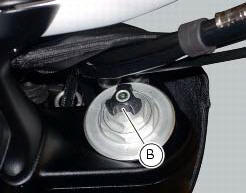
On the carbon model, adjustment is done using the knob (b) on the fork leg, without a screwdriver.
Turn the adjuster (3) on fork leg bottom with a flat screwdriver to adjust compression damping.
As you turn the adjusters (1) and (3), you will hear them click. Each click corresponds to different damping setting.
The stiffest damping setting is obtained with the adjuster turned fully clockwise to the "0" position. Starting from this position, turning counter clockwise, you can count the turns.
To change preload of the spring inside each fork leg, turn the hex. Adjuster (2) with a 22 mm hexagon wrench, starting from the fully open position (clockwise). From reference (a), every full turn clockwise corresponds to 1 mm of preload of the spring, up to a maximum of 15 mm, corresponding to 3 full turns.
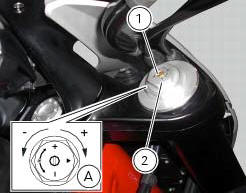
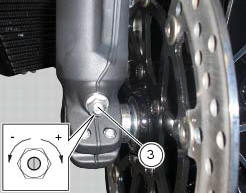
Standard settings, from fully open position, are as follows: compression: 1 turn and a half; rebound: 1 and a half turns.
Spring preload: fully open (counter clockwise).
Important
Adjust both fork legs to same settings.
 Adjusting the position of the gear change and rear brake pedals
The position of the gear change and rear brake pedals in relation to the
footrests can be adjusted to suit the preferred
riding position.
To modify the gear change pedal position act in the foll ...
 Adjusting the rear shock absorber
The adjuster (1) located on the lower connection holding the shock absorber
to the swingarm adjusts the damping during
the rebound phase (return).
The knob (2), located on the left side of the m ...
Other materials:
Cleaning and replacing the spark plugs
Spark plugs are essential to smooth engine running and
should be checked at regular intervals.
The condition of the spark plugs provides a good indication of
how well the engine is running.
Have the spark plugs inspected or replaced at a ducati dealer
or authorised service centre; they will ...
Refitting the number plate holder
Place the number plate light (5), as indicated, on the number plate holder
plate (8) and tighten the screws (7) to a torque
of 2 nm +/- 10% (sect. 3 - 3, Frame torque settings).
Thread the number plate light wiring (c) into the opening in the number plate
holder plate as shown.
Fit ...
Removing the flywheel - generator assembly
Use the tool 88713.3367 Fixed to the m10 side stand fixing holes (d).
Secure the tool to the flywheel with the screws (e).
Unscrew the alternator-flywheel retaining nut (15).
Warning
While unscrewing the nut, apply axial pressure to the socket to
avoid damage or injury in the event of the ...