
Ducati Diavel Service Manual: Airbox - throttle body
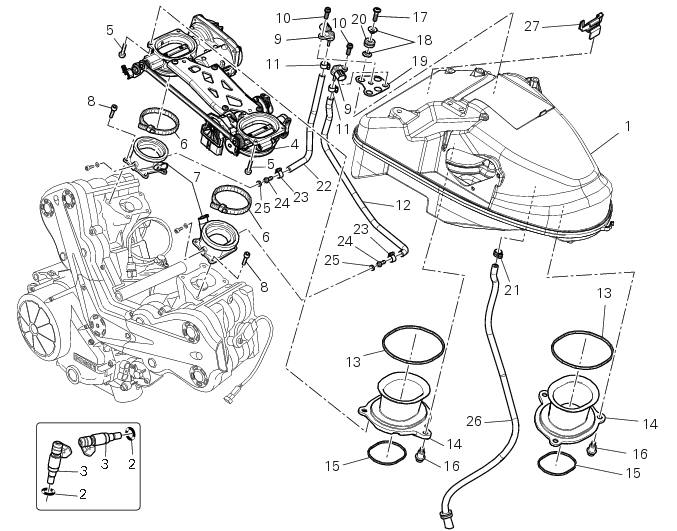
- Airbox
- O-ring
- Injector
- Throttle body assembly
- Screw
- Clamp
- Intake manifold
- Screw
- Pressure sensor
- Screw
- Clamp
- Hose
- Sealing washer
- Intake manifold
- Sealing washer
- Screw
- Screw
- Spacer
- Bracket
- Rubber pad
- Clamp
- Hose
- Clamp
- Union
- Washer
- Hose
- Cable grommet
- Spare parts catalogue
- Diavel abs throttle body
- Diavel abs Air intake - oil breather
- Diavel abs fuel system
- Diavel carbon abs throttle body
- Diavel carbon abs air intake - oil breather
- Diavel carbon abs fuel system
Important
Bold reference numbers in this section identify parts not shown in the figures alongside the text, but which can be found in the exploded view diagram.
 Refitting the fuel tank
If the fuel tank has been disassembled into its component parts, reposition
all the parts as shown in the exploded view.
In particular:
tighten the screws (13) to a torque of 5 nm +/-10% (sect. ...
 Removal the airbox and throttle body
Loosen the screws (a) and remove the plate (b) that fixes the main wiring to
the airbox.
Undo the screws (17) and remove the air pressure sensors (9) with the support
(19).
Release t ...
Other materials:
Riding safety
The points given below are applicable for every day
motorcycle use and shoud be carefully observed for safe and
effective vehicle operation.
A motorcycle does not provide the impact protection of an
automobile, so defensive riding in addition to wearing
protective apparel is extremely importa ...
Reassembly of the cylinder head
The exhaust side can be identified by the three threaded holes on the flange.
The intake side can be identified by the presence of four threaded holes on
the flange.
All the photos in this chapter refer to a vertical cylinder head.
Valve guide sealing rings
Position the cylinder head o ...
Checking brake and clutch fluid level
The levels should not fall below the min marks on the
respective reservoirs.
If the level is too low, air can get into the circuit, thus
impairing the efficiency of the system.
Brake and clutch fluid must be topped up and changed at the
intervals specified in the scheduled maintenance table ...