
Ducati Diavel Service Manual: Checking valve lift
Set the engine to the configuration described for the "checking and adjusting the valve clearances", previously indicated.
Position the tool 88765.1518 On the cylinder head: the part marked "a" should be on the intake side and the part marked "s" should be on the exhaust side.
Seat the plate (a) and tighten the screws (b).
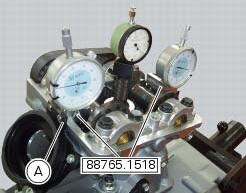
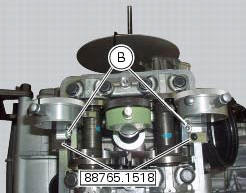
Set the opening valve clearance to zero when the camshaft is in its rest position by fitting a feeler gauge between the upper rocker arm and the opening shim.
Lock the dial gauge into the seat of the stand marked "a" and position the fork probe against the face of the closing shim.
Set the dial gauge to zero when the valve is fully closed.
Rotate the intake camshaft so as to allow the intake valves to lift fully.
Check on the dial gauge that the measured value corresponds to the prescribed one (sect. 3 -1.1, Timing system/valves).
Repeat the same operation for the exhaust valves, using the dial gauge in the support seat 88765.1518 With the marking "s".
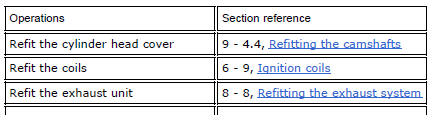
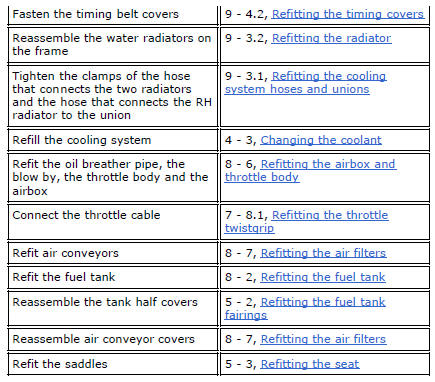
Refit the components by carrying out the same operations indicated in chapter "checking and adjusting the valve clearances", previously described.
Refit the components removed in the procedure.
 Checking and adjusting the valve clearances
Note
For clarity, the figures show the engine removed from the frame.
Move the piston of the cylinder being checked to tdc of the power stroke: in
this condition, all the valves are closed and ...
 Checking the engine timing
Set the engine to the configuration described for the "checking and adjusting
the valve clearances", previously indicated.
Install tool 88765.1188 (G) in the spark plug bore to determine the ...
Other materials:
Refitting the tail light
Fit the spacers with collar (3) into the rear vibration dampers (2) located
on the gloves compartment (23).
Note
Two spacers (3) must be inserted inside and outside on the right side and
two spacers (3) must be inserted inside and
outside on the left side.
Insert the split vibration damp ...
Removal of the intake manifold and coolant union
Loosen the clips (f) and remove the hoses (t).
Remove the manifolds (25) undoing the screws (21).
Loosen the clamp (a) and remove the hose (b). Remove the union (12) and
recover the seal (24).
...
Removal of the movable tensioner/timing belt
Loosen the nut (8) and remove the washer (7) and the tensioner pulley (9)
from the pin (12) on the cylinder head.
Remove the timing belt (14) from the horizontal cylinder assembly.
Important
If the belts are to be re-used, mark the direction of rotation with an
arrow and also mark the cylin ...